
Limited offer · Closing in00d00h00m00s
Station 06 · Contact actions

GHL contact action buttons: one tap, workflow started

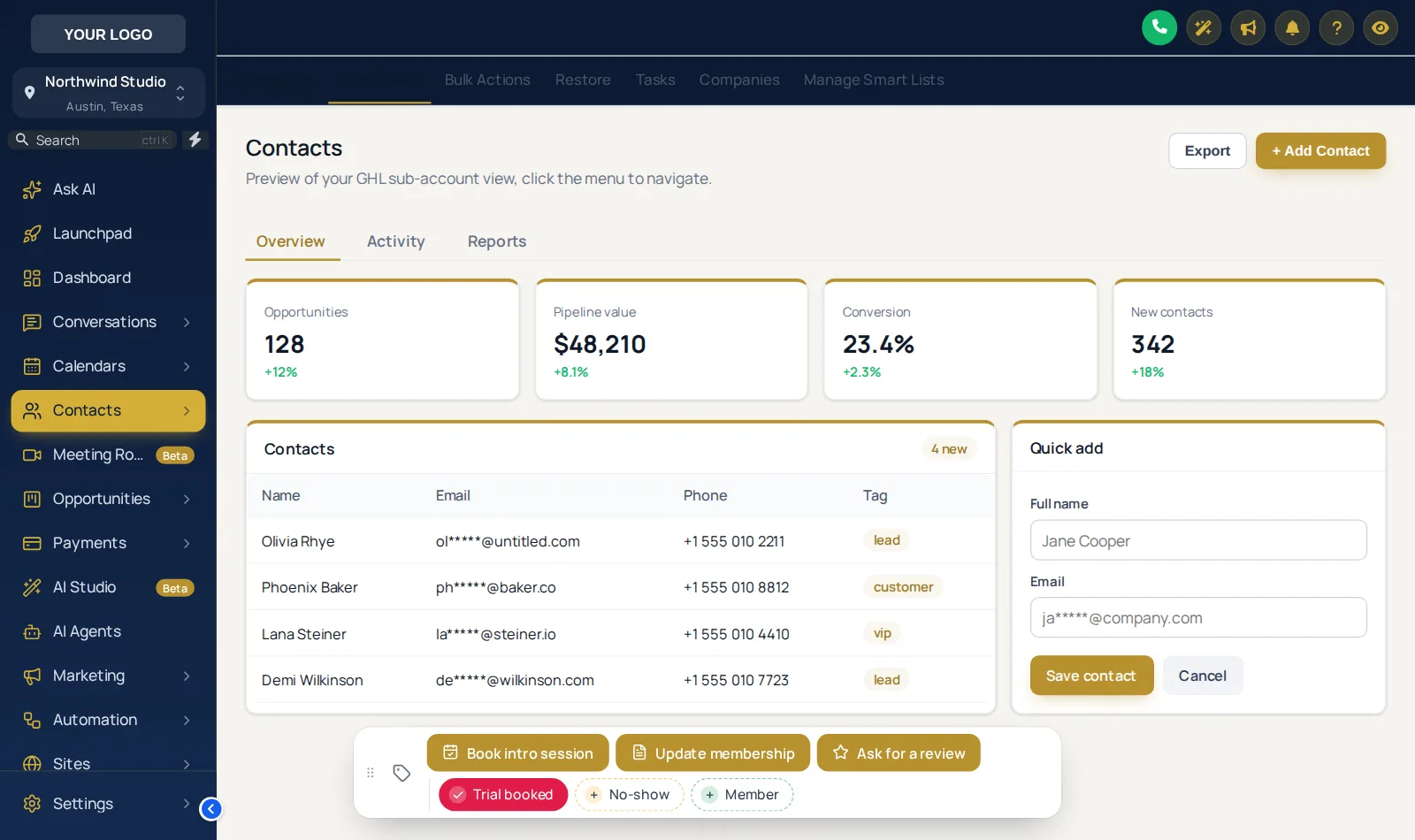
Tagging a contact to start a workflow takes about six clicks in stock GoHighLevel. Your account adds a bar to every contact page with quick tags and buttons for the jobs your front desk does all day: trial booked, no-show, update membership, ask for a review. One tap, and the right automation runs. From Power Set, $397 one-time.

Contact · Jordan P.example
✓ Trial bookedNo-showMember
Book intro session Update membership Ask for a review

Tag "trial booked" added, so the trial reminder workflow can start

A day at the desk (example)

Starting a workflow should not take six clicks

Open the tag box, type, pick, check the spelling, save. Multiply by every walk-in. Here is the same day with the bar.

  1. 01

    A lead walks in for a free class

    Front desk opens the contact and taps "Trial booked". The tag lands, and the trial reminder workflow you already have starts.

  2. 02

    Class ends, they did not show

    Coach taps "No-show" on the way past the desk. Your no-show recovery sequence picks it up from the tag.

  3. 03

    They sign up

    "Update membership" opens a short form: plan, start date, main goal. It saves straight to custom fields; no scrolling the record.

  4. 04

    Thirty days later

    "Ask for a review" adds the tag your review request workflow listens for. Tap again to remove it.

Action lab

The real bar, with gym tags

Tap a quick tag, open Update membership, drag the bar by its grip. Nothing is saved in the preview.

Action labapp.yourgymagency.com/v2/location/contacts/detail

Loading the live preview

A color per tag · The real contact action bar with gym tags. Tap a quick tag, open Update membership, or drag the bar by its grip. Nothing is saved in the preview; inside GoHighLevel the contact updates at once.

Contact action bar on a GoHighLevel contact with Trial booked, No-show and Member quick tags
Quick tags and buttons on a sample contact
What it can do

Quick tags, buttons and pop-up forms

  • Quick tags show whether the contact has the tag, with colors for added and not yet added.
  • Buttons add, remove or toggle tags, so one press starts the workflow listening for it.
  • Pop-up forms fill custom fields: text, number, date, drop-down, email, phone or link.
  • Your own messages when a tag is added or removed, and a success line per button.
  • Optional notes on the contact recording who changed what.
  • Per sub-account visibility for agencies with different gym brands.
How to wire it

Four sets from tag box to one tap

Buttons are only as good as the workflows behind them. If you do not have trial, no-show and review workflows yet, the Fitness Snapshot's SMS automations include them.

  1. List the daily jobs

    Write down which tags and fields your team sets by hand every day and which workflows they should start.

  2. Build chips and buttons

    Quick tags with their own colors, buttons that add, remove or toggle tags, and pop-up forms mapped to custom fields.

  3. Wire to your workflows

    Each button uses the exact tag your GoHighLevel workflows listen for, so pressing it starts the right automation.

  4. Place and test

    Choose one of 6 starting positions, test every button on a test contact and show your team where it lives.

Packages

Contact actions start at Power Set

Tier 1

Warm Up

$167one-time · lifetime
Not in this tier

Your brand on every GoHighLevel screen: all themes, UI kits, dark mode and every animated login page design.

  • All 27 themes and all 11 UI kits
  • Dark mode for GoHighLevel pages
  • Sidebar or top-bar layout, your logo and brand colors
  • All 16 animated login page designs
1 workspace3 team membersLogin in minutes
Get the Warm Up account · $167
Tier 3

Peak Performance

$797one-time · lifetime
✓ Includes this module

Everything the customizer does: popups, social proof, calculators and floating widgets for your gym website, plus a white-labeled editor.

  • Everything in Power Set
  • Popups: 43 templates, up to 15 live
  • Notifications and social proof: 94 templates, up to 15 live
  • Calculators: 134 templates, up to 10 live
  • Floating widgets: 51 templates, up to 10 live
3 workspaces10 team membersLogin in minutes
Get the Peak Performance account · $797
Questions

Contact action questions

How the buttons talk to your tags, fields and workflows.

They are one-tap chips and buttons that sit on every GoHighLevel contact page. A chip adds or removes a tag; a button can add, remove or toggle tags or open a short form that saves to custom fields. Pressing them starts the workflows that listen for those tags.

Usually not. Buttons use the tags your workflows already listen for. If a workflow does not have a tag trigger yet, add one, or use the Fitness Snapshot automations, which already work with tags.

Text, paragraph, number, date, drop-down, email, phone and link fields, each mapped to a custom field on the contact. For gyms that usually means membership plan, start date, goal or injury notes.

Yes. New tags and field values show on the contact page at once, with no reload. If GoHighLevel refuses a change, the chip flips back and says why.

Optionally, yes: each action can add a note saying which tag was added or removed and by whom, or which field changed from what to what. Handy when several coaches share one member.

Yes. Each chip or button can show in every sub-account or only in the ones you list, so a boxing gym and a yoga studio in the same agency can each have their own.

It starts in one of 6 positions, anyone can drag it by its grip, it remembers where they left it, and a double-click on the grip puts it back.

Power Set, $397, and above. It sits with the menu, dashboard and pipeline designs as part of the daily-work toolkit.

Ready when you are

Turn the front desk's daily clicks into taps

The contact actions bar comes with mega menus and the dashboard and pipeline designers in Power Set: $397 one-time, login in minutes.

One-time, lifetime accessSecure checkout by StripeLogin emailed in minutes
Warm Up · 1 workspace, 3 team members$167
Power Set · 2 workspaces, 5 team members$397
Peak Performance · 3 workspaces, 10 team members$797

Last updated October 2, 2026. GoHighLevel and HighLevel are trademarks of HighLevel Inc. Fitness Snapshot is independent and is not affiliated with, endorsed by or sponsored by HighLevel. The GHL CRM Customizer is a self-serve account on the GHL Customer Care customizer: you customize and install it yourself, with help docs and support if you get stuck. Feature counts reflect the customizer catalogue on the date above. Screens shown are live previews and screenshots of sample data, not client accounts.