
Limited offer · Closing in00d00h00m00s
Station 05 · Pipelines

GoHighLevel pipeline design that shows where trials stall

On the stock board, New lead and Joined look the same: grey columns, white cards. The pipeline designer gives you 12 board designs with stage colors by position, styled deal cards and bold values, so a coach sees in one glance where trial members pile up. From Power Set, $397 one-time.

  1. 01New lead
  2. 02Trial booked
  3. 03Showed up
  4. 04Offer made
  5. 05Joined
Problem → outcome

Every stage looks the same, so every deal does too

Gyms live and die by the gap between "Trial booked" and "Showed up". On a grey board that gap is invisible until you count cards. Color by position makes it obvious: a fat red column early in the board is a follow-up problem, a fat one late is a closing problem.

Stage colors follow position, not names. Column one gets color one, column two gets color two, then they repeat. Nothing is tied to stage names, so every pipeline in every sub-account picks up the design with zero renaming.

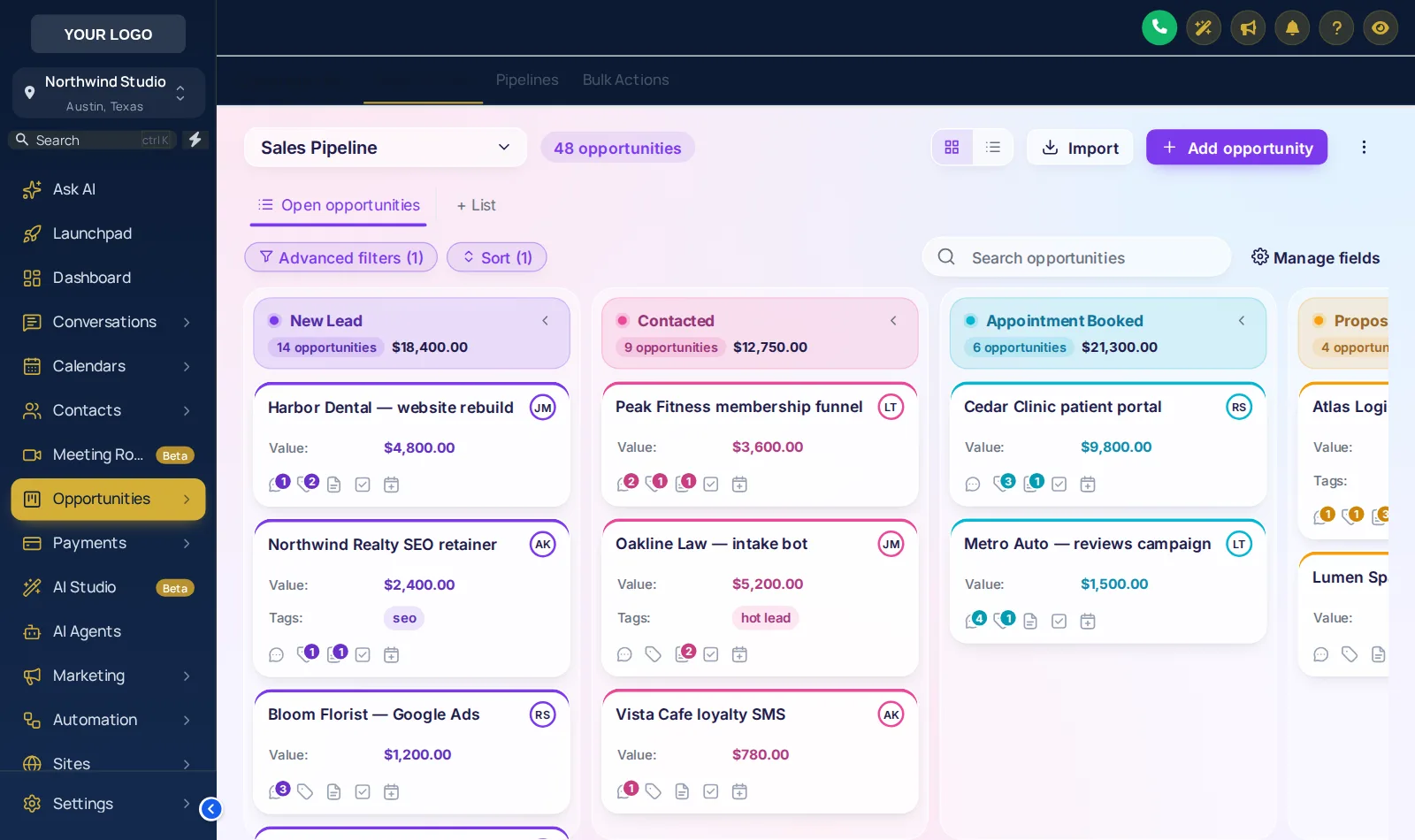
GoHighLevel opportunities board with the Frosted Glass design and colored stages
Frosted Glass · see-through lanes on a color mesh
Pipeline lab

Try all 12 board designs

Click a design and the sample board restyles itself. Scroll the board sideways inside the frame to see every stage.

Pipeline labapp.yourgymagency.com/v2/location/opportunities

Loading the live preview

Frosted Glass · A copy of the GoHighLevel opportunities board with a sample pipeline. Stage colors follow column position, so your own stages (Trial booked, Showed, Joined...) pick them up whatever they are called.

What gets styled

Columns, cards, values, toolbar and list view

  • Stage headers as cards, plain, tinted, filled or underlined, with a color dot and deal count as text or a badge.
  • Column backgrounds soft, tinted, glass or outlined.
  • Deal cards with the stage color as a stripe or dot, three densities from compact to spacious.
  • Values in bold and in the stage color, so membership revenue reads across the room.
  • Toolbar and list view in soft, pill, glass, outline or bold to match.

All 12 designs

Clean LightFrosted GlassMidnight Neon · darkNeo BrutalCandy PastelGradient HeadersCompact ProColour RibbonObsidian Gold · darkOcean ProEmerald CalmBrand Match

Running the Fitness Snapshot? Its trial-to-member pipelines are exactly what this board was made to show.

How it goes in

Three sets, zero pipeline changes

The designer never touches your stages, values or automations. The board design is a layer on top, switched on for your agency.

  1. Pick a board design

    Open the pipeline designer and choose one of the 12 board templates, light or dark, to match your theme.

  2. Set stage colors

    Keep the template colors, build them from your brand color, or pick each one. Colors follow column position, so every pipeline in every location is covered.

  3. Save and check

    Save, then open your opportunities in GoHighLevel: drag a deal between stages and flip to list view to see both restyled.

Packages

Board designs start at Power Set

Tier 1

Warm Up

$167one-time · lifetime
Not in this tier

Your brand on every GoHighLevel screen: all themes, UI kits, dark mode and every animated login page design.

  • All 27 themes and all 11 UI kits
  • Dark mode for GoHighLevel pages
  • Sidebar or top-bar layout, your logo and brand colors
  • All 16 animated login page designs
1 workspace3 team membersLogin in minutes
Get the Warm Up account · $167
Tier 3

Peak Performance

$797one-time · lifetime
✓ Includes this module

Everything the customizer does: popups, social proof, calculators and floating widgets for your gym website, plus a white-labeled editor.

  • Everything in Power Set
  • Popups: 43 templates, up to 15 live
  • Notifications and social proof: 94 templates, up to 15 live
  • Calculators: 134 templates, up to 10 live
  • Floating widgets: 51 templates, up to 10 live
3 workspaces10 team membersLogin in minutes
Get the Peak Performance account · $797
Questions

Pipeline board questions

How the opportunities board design works with your existing pipelines.

Yes. A GoHighLevel pipeline design restyles the opportunities board: stage headers, column backgrounds, deal cards, values, the toolbar and the list view. There are 12 templates, 2 of them dark.

No. Stage colors follow column position, not names. The first column gets the first color, the second the next, and they repeat after the last. Your trial pipeline, PT pipeline and win-back pipeline all pick it up.

No. Stages, values, workflows and triggers stay exactly as they are. Only the look of the board and list view changes.

Yes. Cards do not shift on hover, so dragging a deal from Trial booked to Joined is as precise as it is in stock GoHighLevel.

Yes. The value can show in bold and in the stage color, with your own colors for deal names, field labels and values, so the money column reads at a glance.

Yes. The toolbar above the board, with the pipeline picker, filters and search, and the list view are restyled to match the board.

The pipeline designer with all 12 designs is in Power Set, $397 one-time, and above. The design you save applies to every pipeline in every sub-account.

Yes. The live lab on this page runs the real engine on a copy of the GoHighLevel opportunities board. Scroll the board sideways inside the frame to see every stage.

Ready when you are

See every stalled trial at a glance

Power Set adds the pipeline and dashboard designers, mega menus and contact buttons to every theme and login design: $397 one-time, lifetime access.

One-time, lifetime accessSecure checkout by StripeLogin emailed in minutes
Warm Up · 1 workspace, 3 team members$167
Power Set · 2 workspaces, 5 team members$397
Peak Performance · 3 workspaces, 10 team members$797

Last updated October 2, 2026. GoHighLevel and HighLevel are trademarks of HighLevel Inc. Fitness Snapshot is independent and is not affiliated with, endorsed by or sponsored by HighLevel. The GHL CRM Customizer is a self-serve account on the GHL Customer Care customizer: you customize and install it yourself, with help docs and support if you get stuck. Feature counts reflect the customizer catalogue on the date above. Screens shown are live previews and screenshots of sample data, not client accounts.