
Limited offer · Closing in00d00h00m00s
Station 03 · Menus

GoHighLevel menu customization for a team that moves fast

Thirty menu items, and your coach needs five. In the menu editor you rename, reorder and hide items in gym language, then put the menu where it works best: left or right sidebar, a top bar in 8 styles, 8 mega menu styles or a floating quick menu. Sidebar or top-bar layout comes with every account; mega menus and the floating quick menu start at Power Set, $397.

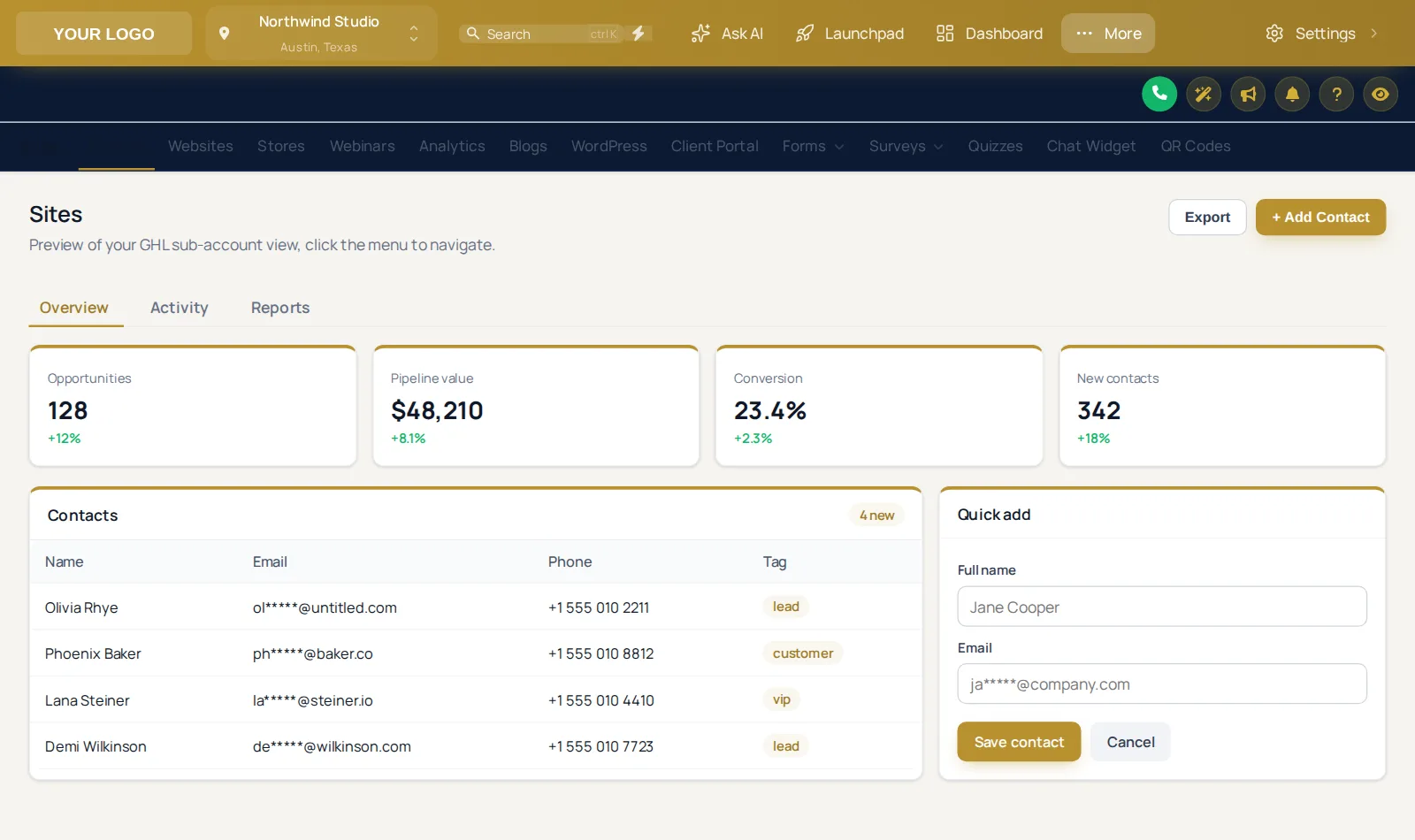
GoHighLevel menu turned into a brand-colored top bar on the Royal Navy and Gold theme
Royal Navy & Gold with a brand top bar
Problem → outcome

Speak gym, not software

The stock menu shows every tool to everyone, in GoHighLevel's order, with GoHighLevel's names. New front-desk hires take weeks to learn where "Opportunities" lives. Rename it "Trials to members", put it second, hide what they never use, and the menu teaches itself.

Hiding is not permissions. A hidden item disappears from the menu; GoHighLevel roles still control access. Set the menu for focus and leave security to permissions.

GoHighLevel calls itYour team sees
ConversationsMember inbox
CalendarsClass schedule
OpportunitiesTrials to members
ContactsMembers & leads
PaymentsBilling & packs
ReputationReviews
Menu lab

Switch the layout, then use the menu

Top bar is selected; try the glass and slim styles, a mega sub-menu (hover Sites), or the left sidebar. Payments and Sites open their own sub-menus just like GoHighLevel.

Menu labapp.yourgymagency.com/v2/location/payments

Loading the live preview

Top bar · Pick a layout, then use the menu inside the frame. Payments and Sites open their own sub-menus; with a mega style chosen, hover Sites.

The floating quick menu

For coaches who bounce between the same pages. Open it, hover it, drag it by the grip.

Quick menuapp.yourgymagency.com/v2/location/contacts

Loading the live preview

Dock bar · The quick menu floats over every page. Open the bubble, hover the dock or rail, and drag it by its grip to move it.

Which layout?

Six menu layouts and where each fits a gym

LayoutWhat it isBest for
Left sidebarThe GoHighLevel default, renamed and trimmedDesktop-heavy teams, most single gyms
Right sidebarThe menu docked on the rightStaff who use the left of the screen for notes or a second app
Top barA horizontal bar in 8 styles, from solid to glass and slimWide screens at the front desk; more room for the pipeline board
Top bar, merged headerMenu and header in one rowLaptops on the gym floor where every pixel of height counts
Collapsed iconsIcons only, labels on hoverExperienced staff who know where everything is
Floating quick menuA bubble, dock or side rail in 8 designsCoaches who jump between the same four pages all day

Header styles available: GoHighLevel default, Soft tint, Brand, Gradient, Aurora, Dark, Glass, Accent line. Top bar styles: Solid, Floating, Glass, Brand gradient, Underline, Segmented, Centered, Slim.

How to build it

From thirty items to the five that matter

Most of the work is listening: ask your team who opens what, when. The editing itself takes minutes with a live preview; the thinking is what makes the menu stick. Combine it with a dashboard redesign so the first page after login is the right one.

  1. Map who uses what

    List the pages your coaches, front desk and managers open each day, and what they never touch.

  2. Rename, reorder, hide

    Menu items get gym words, the busiest pages move to the top, and screens nobody needs disappear from view.

  3. Pick the layout

    Sidebar, right dock or top bar, header style, sub-menu or mega menu style, and a floating quick menu if it helps.

  4. Save for every view

    Agency and sub-account views each get their own layout and update on the next page load.

Packages

The menu builder starts at Power Set

Tier 1

Warm Up

$167one-time · lifetime
Not in this tier

Your brand on every GoHighLevel screen: all themes, UI kits, dark mode and every animated login page design.

  • All 27 themes and all 11 UI kits
  • Dark mode for GoHighLevel pages
  • Sidebar or top-bar layout, your logo and brand colors
  • All 16 animated login page designs
1 workspace3 team membersLogin in minutes
Get the Warm Up account · $167
Tier 3

Peak Performance

$797one-time · lifetime
✓ Includes this module

Everything the customizer does: popups, social proof, calculators and floating widgets for your gym website, plus a white-labeled editor.

  • Everything in Power Set
  • Popups: 43 templates, up to 15 live
  • Notifications and social proof: 94 templates, up to 15 live
  • Calculators: 134 templates, up to 10 live
  • Floating widgets: 51 templates, up to 10 live
3 workspaces10 team membersLogin in minutes
Get the Peak Performance account · $797
Questions

Menu builder questions

Renaming, hiding, layouts and what they do and do not change.

Yes. GoHighLevel menu customization covers renaming, reordering, hiding and grouping every item, adding your own links, and moving the menu to a right sidebar, a top bar or a merged header, plus mega menus and a floating quick menu.

No. Hiding is about focus, not security. User permissions in GoHighLevel still decide what someone can open. Use permissions for access and the menu for a cleaner view.

Sections with sub-pages, such as Payments or Sites, can open as a panel instead of a list. There are 8 mega menu styles: Columns, Split, Cascade, Tiles, Tabs, Icon rail, Accordion, Wide.

Agency and sub-account views each get their own layout. Within a sub-account, what each person can open still follows their GoHighLevel role permissions.

Yes. Add links to your class booking page, coaching docs, a help video or anything else, opening inside the app or in a new tab.

A small menu that floats over every page with the pages people use most. It comes as a bubble with a grid, a dock bar or a side rail in 8 designs, and anyone can drag it out of the way.

Sidebar or top-bar layout is in every account. Mega menus and the floating quick menu start at Power Set, $397. They sit alongside the dashboard, pipeline board and contact buttons, because those are the parts of GoHighLevel staff touch every day.

Your layout is saved in the customizer, not hard-coded, so it can be updated in minutes. If GoHighLevel adds or renames something, open the menu editor and place, rename or hide it yourself in a minute.

Yes. Sub-menus open on tap, and the preview on this page has a phone view so you can check small screens before you order.

Ready when you are

Cut the menu down to what your coaches use

Power Set unlocks mega menus, the quick menu, dashboard and pipeline designers and contact buttons on top of themes and login designs. $397 one-time, login in minutes.

One-time, lifetime accessSecure checkout by StripeLogin emailed in minutes
Warm Up · 1 workspace, 3 team members$167
Power Set · 2 workspaces, 5 team members$397
Peak Performance · 3 workspaces, 10 team members$797

Last updated October 2, 2026. GoHighLevel and HighLevel are trademarks of HighLevel Inc. Fitness Snapshot is independent and is not affiliated with, endorsed by or sponsored by HighLevel. The GHL CRM Customizer is a self-serve account on the GHL Customer Care customizer: you customize and install it yourself, with help docs and support if you get stuck. Feature counts reflect the customizer catalogue on the date above. Screens shown are live previews and screenshots of sample data, not client accounts.