
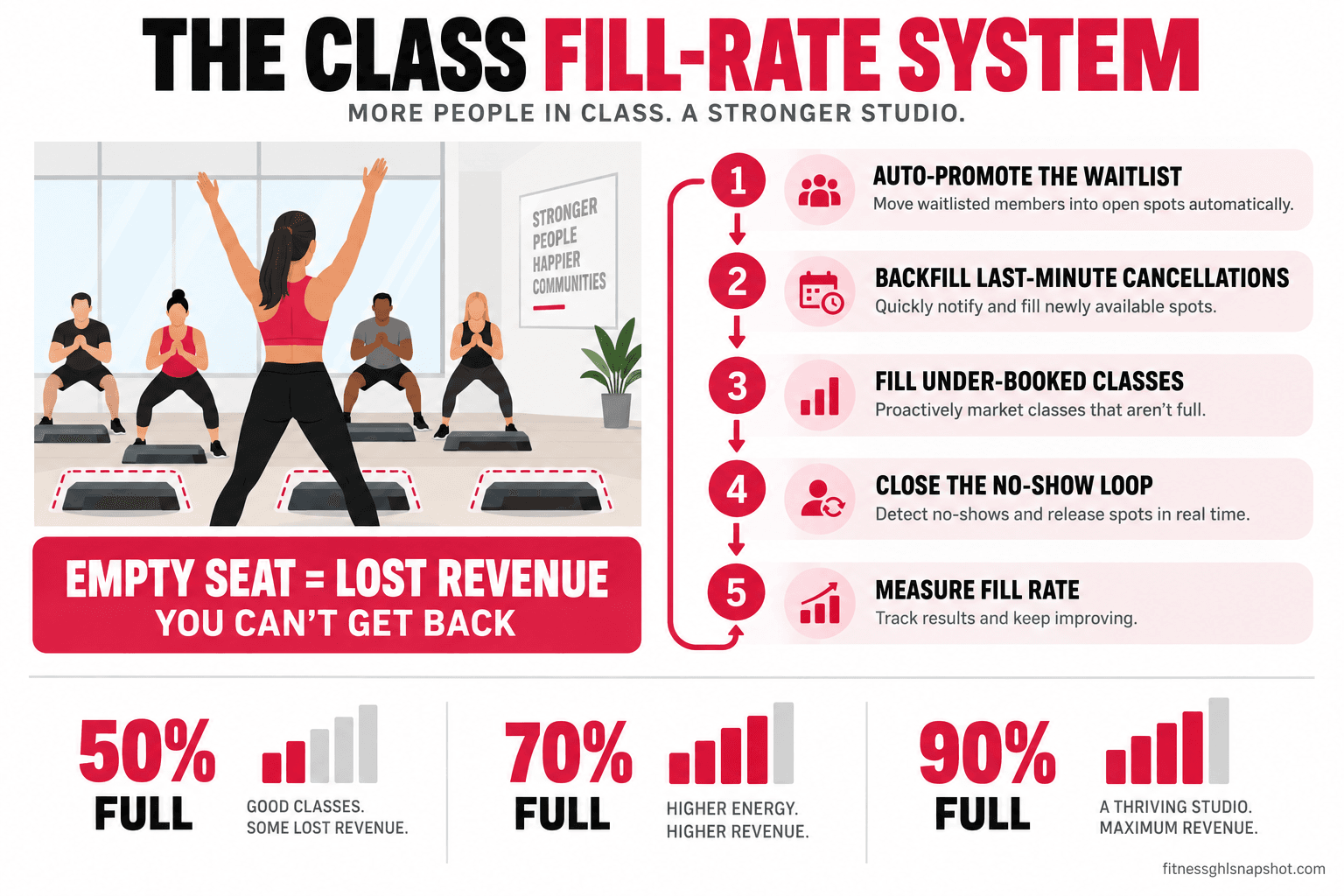
Here is the short version: an empty class seat is money you can never get back, because the class costs the same whether it runs at 60 percent or 100 percent full. The fix is a fill-rate system that runs on autopilot: a waitlist that promotes the next person the second a spot opens, a backfill blast that fills last-minute cancellations before class starts, targeted invites that fill your chronically quiet classes, a late-cancel and no-show policy that protects the seat, and one number, fill rate, that tells you which classes to keep and which to cut. Set it up once and your popular classes stop turning people away while your quiet ones stop running half empty.
It is 5:52pm and the 6pm strength class is about to start. Two people just cancelled in the app in the last twenty minutes, so the room that was full is now sitting at sixteen out of twenty. Meanwhile there are four names on the waitlist for that exact class who never got told a spot opened up, because nobody was watching the app at 5:40 while the desk was busy checking in the crowd. Two paying-capacity seats run empty, four members who wanted in stay home annoyed, and the class still costs you the full coach, the full hour, and the full slice of rent. Nothing about the room looks broken. The money just quietly did not show up.
That gap, between the seats you could have filled and the seats that actually ran, is one of the most fixable leaks in a class-based gym or studio. It is not a demand problem. The demand was sitting on the waitlist. It is a speed-and-attention problem, and speed-and-attention problems are exactly what automation solves. This post is the full system: the stages, the exact messages, how each stage breaks, and how it scales from a solo trainer to a multi-coach gym.
Table of contents
- What an empty class seat actually costs you
- The fill-rate system: five stages
- Stage 1: Set the waitlist up so it can actually work
- Stage 2: Auto-promote the next member the second a spot opens
- Stage 3: Backfill last-minute cancellations before class starts
- Stage 4: Fill your chronically under-booked classes
- Stage 5: Close the no-show loop and protect the seat
- Measure fill rate, then prune the schedule
- The same system at three sizes
- Steal this: the messages that fill the seats
- The compliance wrinkle on automated class texts
- Objections operators raise
- FAQ
What an empty class seat actually costs you
Start with the math, because it is the part most owners never run. A class has a fixed cost to put on. The coach gets paid the same. The hour of studio time is gone whether one person or twenty show up. Your rent for that square footage does not drop because the 2pm ran quiet. So the cost of a class is basically flat, and every seat you fill on top of the ones already covering that cost is close to pure margin.
Here is what that means in practice. Say a class seats 20, your average member value works out to roughly $12 of revenue attributable to a class attended, and it costs you about $90 to run the class (coach plus a share of fixed costs). At 8 attendees the class barely washes its face. At 14 it is comfortably profitable. At 20 it is a machine. The difference between a class that runs at 70 percent and one that runs at 95 percent is not a little. Across a full weekly schedule it is the difference between a studio that feels busy and one that actually pays you.
Now stack the two failure modes. Popular classes turn people away while a waitlist sits unworked, so you lose the easiest revenue you will ever get: buyers who already raised their hand. Quiet classes run half empty and drag your whole schedule’s economics down. Both are fill-rate problems, and both are invisible if you only look at whether a class “ran.” The room can look fine at every hour of the day while the schedule as a whole leaks margin.
The fill-rate system: five stages
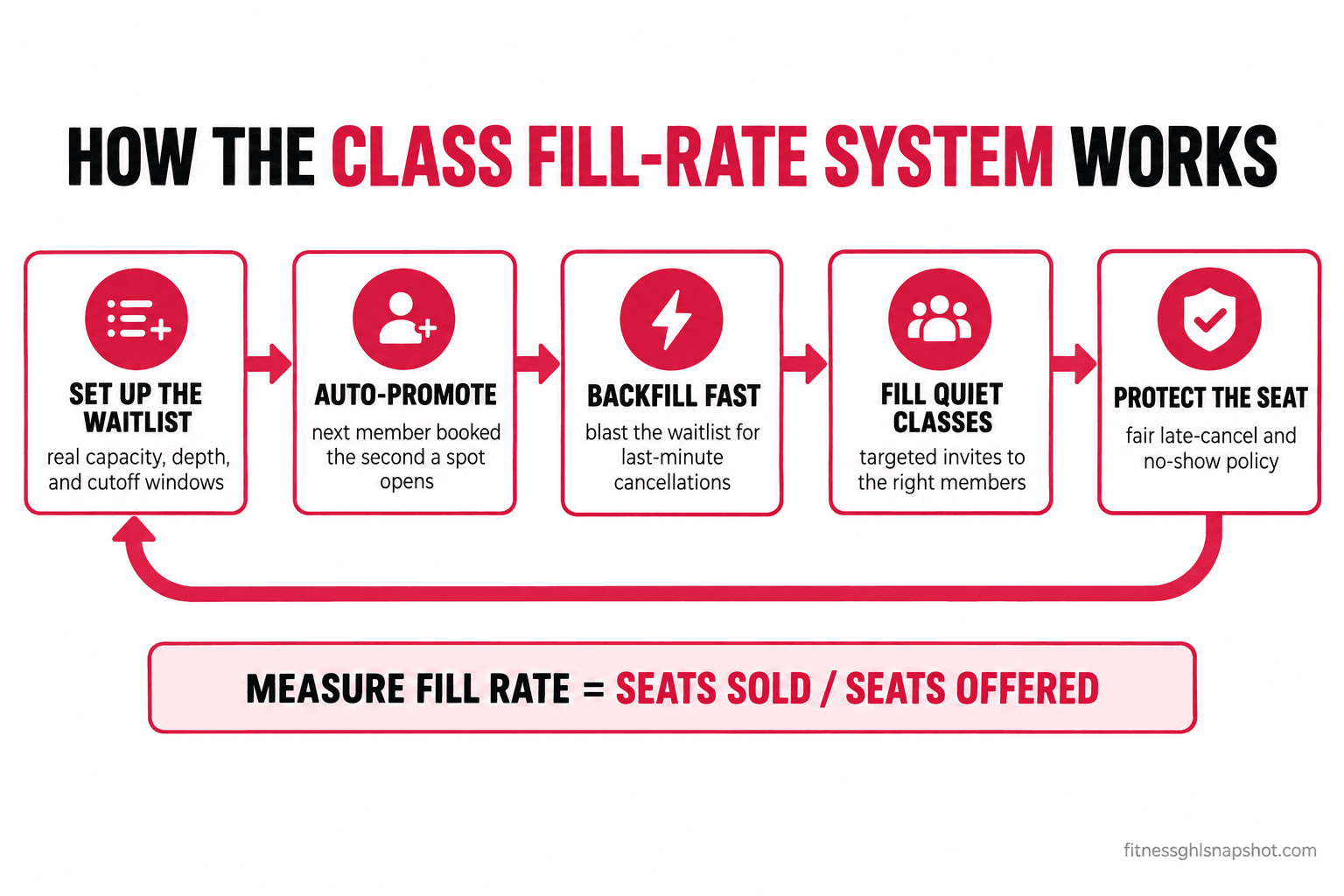
The system is five moving parts that run in a loop. Stage 1 sets the waitlist up so it can function at all. Stage 2 promotes waitlisted members automatically when a normal cancellation opens a spot. Stage 3 handles the harder case: the last-minute cancellation, where speed is everything. Stage 4 goes on offense and fills classes that are quiet before anyone even waitlists. Stage 5 protects every seat with a late-cancel and no-show policy so the system does not get gamed. Underneath all five sits one number, fill rate, that tells you whether it is working.
You do not have to build all five at once. If you run popular classes with real waitlists, start with Stages 1 and 2 and you will feel it in a week. If your problem is quiet classes, Stage 4 is your first move. Most booking tools already have the raw waitlist feature. The system is what you wrap around it.
Stage 1: Set the waitlist up so it can actually work
A waitlist only works if the rules underneath it are set correctly, and most gyms leave them on the defaults. Three settings decide everything.
First, real capacity. Set the class cap to the number of people who can safely and comfortably train, not an aspirational number and not a padded one. A cap that lies makes every downstream number lie too.
Second, waitlist depth. Decide how many people can join the waitlist. Too shallow and you cannot backfill a run of cancellations. Too deep and you promote someone who mentally checked out three days ago. For most studios, a waitlist of four to six on a class of twenty is plenty.
Third, and this is the one people miss, the cutoff windows. You need two: how late someone can still get auto-promoted from the waitlist (usually up until class start, or a set number of minutes before), and how late a booked member can cancel without penalty. These two windows are the backbone of the whole system, because they define the difference between a normal cancellation you can fill and a last-minute one you have to scramble for.
How it breaks. The classic failure is a waitlist that requires the member to manually accept an open spot with no time limit. Someone cancels, the next person gets an email, they see it three hours later, the seat sat dead the whole time, and by then it is too late. A waitlist with no auto-promotion and no claim window is just a list, not a system. The other common break is a cancellation window that is too generous, so members cancel at 5:55 for a 6pm with zero consequence and you can never fill the hole in time.
What to do. Turn on automatic promotion (not manual accept-only), set a claim window if your tool offers action-required mode (something like ten to fifteen minutes to confirm, then it rolls to the next person), and set your late-cancel window somewhere between two and twelve hours before class depending on your model. The platforms you already know handle this: PushPress, TeamUp, Gymdesk, Mindbody, and Glofox all include an auto-promoting waitlist. The feature is rarely the problem. The settings are.
Stage 2: Auto-promote the next member the second a spot opens
This is the core of the system. A booked member cancels outside the last-minute window, which means there is time to fill the spot cleanly. The moment that cancellation happens, the next person on the waitlist should be moved into the class and told, automatically, with no human involved.
There are two ways tools do this, and you should know which one you are using. In auto-registration mode, the next waitlisted member is simply booked into the class and notified: “you’re in.” In action-required mode, they get a message with a short window to claim the spot, and if they do not, it rolls to the next person. Auto-registration fills seats faster and is better for classes far enough out that a surprise booking is welcome. Action-required is safer close to class time, when auto-booking someone who cannot make it just recreates the empty seat.
The message matters as much as the mechanism. A good promotion text is instant, clear, and makes the next step obvious. “You’re off the waitlist and booked into 6pm Strength. See you there. Tap here to cancel if plans changed” does three jobs at once: confirms the win, sets the expectation, and gives a clean out so you do not turn the promotion into the next no-show.
How it breaks. The two failure modes are speed and stale notifications. If promotion is not automatic, the seat sits empty while the message waits for a human. And if you auto-promote someone the day before but never remind them, they forget they got in, do not show, and you are back where you started with a seat that reads “booked” but runs empty. Promotion without a reminder is half a system.
What to do. Turn on automatic promotion, then chain your normal class reminder onto the newly promoted booking so a promoted member gets the same “see you at 6pm” nudge as everyone else. If leads and members are already getting fast automatic responses elsewhere in your gym, this is the same logic applied to the waitlist. We covered the broader version of instant follow-up in speed to lead for gyms, and the reminder mechanics that stop no-shows in how to reduce gym no-shows.
Stage 3: Backfill last-minute cancellations before class starts
Stage 2 handles the polite cancellation with hours to spare. Stage 3 handles the ugly one: the member who cancels at 5:40 for a 6pm, or simply does not show. Now you have a live seat, maybe two, and twenty minutes to fill them or lose them for good. This is where speed stops being nice to have and becomes the entire point.
Inside the last-minute window, promoting the waitlist one person at a time is too slow. What works is a fast backfill: the moment a seat opens inside the window, blast every eligible waitlisted member (and, if your list is thin, a small segment of members who train at that time) a single message with a one-tap booking link, first to tap gets the seat. Some platforms have a version of this built in that texts the remaining waitlist after the auto-fill window closes. If yours does not, a simple automation that fires on a late cancellation does the same job.
How it breaks. Two ways. First, no eligible audience: if your waitlist is empty at 5:40, there is nobody to promote, which is why Stage 4 (filling classes before they get to this point) matters so much. Second, the double-book: two people tap the same link for one seat, and now you have an awkward “sorry, it’s gone” message to send. A good tool closes the offer the instant the seat is claimed. If yours is clumsy about it, keep the backfill audience small and the window short so the race is fair.
What to do. Build a “seat opened, who wants it” automation on late cancellations that goes to the waitlist first and a tight time-of-day member segment second, with a hard close the moment it is claimed. Keep the copy short and the link one tap. This is the single highest-energy moment in the whole system, and it either works in seconds or not at all.
Stage 4: Fill your chronically under-booked classes
Waitlists only help classes that are popular enough to have one. Your other fill-rate problem is the opposite: the Tuesday 2pm, the Friday night, the new class nobody has discovered yet, all running at 40 percent to a coach getting paid the same as your packed 6pm. You cannot promote a waitlist that does not exist. You have to go get the members.
The move that works is a targeted invite, not a broadcast. Blasting your whole list “come to the 2pm” trains everyone to ignore you and mostly reaches people who were never going to come at 2pm anyway. Instead, segment. Who has attended a similar class, or that time slot, before? Who has an unlimited membership and is under-using it (which is also a churn risk)? Who lives or works near you and has a gap in their week? Send those specific people a specific, warm invite to that specific class, framed as a heads-up rather than a plea.
Timing helps. An invite that goes out the morning of, or the evening before, for a class you can see is running light converts far better than a generic weekly “here’s the schedule” email. You are matching real open capacity to the members most likely to want it, at the moment they can still act.
How it breaks. The invite that reads as desperate (“please, this class needs people”) lowers the value of the class in the member’s mind and rarely works twice. The other break is over-sending: hit the same members with fill-me invites every week and they tune out. Rotate the segment and cap the frequency.
What to do. Build a segment for each quiet class based on past attendance and membership type, and trigger a warm, specific invite when the class is under a fill threshold you set (say, under 50 percent booked 24 hours out). Under-using members are a two-for-one here: filling the class and pulling a quiet member back in before they drift, which is the front edge of churn. We wrote the deeper version of that in stop silent churn before it hits your billing report, and the onboarding habits that get new members into a regular class slot in the first 30 days of member onboarding.
Stage 5: Close the no-show loop and protect the seat
A waitlist means nothing if members can book a spot, not show, and pay no price. Every no-show in a popular class is a double loss: the seat you held for them ran empty, and the waitlisted member who would have taken it stayed home. So the last stage is the policy that makes the seat matter, applied automatically so you never have to be the bad guy in person.
The pieces: a clear late-cancel window (cancel before it, no penalty; cancel after, it counts), a no-show rule (book and do not show, it counts), and a consequence that fits your model. For a credit or class-pack model, a late cancel or no-show burns the credit. For unlimited memberships, a common approach is a small fee after a set number of no-shows in a month, or a temporary booking restriction. The exact rule matters less than that it exists, is communicated up front, and is enforced by the system rather than argued at the desk.
The automation does two things. It applies the consequence (deducts the credit, flags the account, sends the notice) and it feeds the freed seat straight back into Stage 3 so a no-show becomes a backfill opportunity instead of dead air.
How it breaks. Too harsh and you punish good members for real life, and they quit. Too soft and the policy is theater and the seats keep running empty. The other break is silent enforcement: charging a fee the member did not know about creates a chargeback and a bad review, which costs you far more than the seat. Consent and clarity up front are the whole thing.
What to do. Set a fair late-cancel window, communicate the policy at signup and in the booking confirmation, and let the system enforce it automatically and gently, always with a friendly first-time warning rather than a straight penalty. Then wire the freed seat back into the backfill flow. Handled well, a no-show policy barely gets used, because its real job is to make members cancel early enough that Stage 2 can fill the spot cleanly.
Measure fill rate, then prune the schedule
Everything above is invisible unless you measure it, and the number to measure is fill rate: seats sold divided by seats offered, per class, tracked over time. Pull it monthly by class and time slot. It tells you three things at once: which classes are consistently full and could support another session, which are chronically light and need Stage 4 or a schedule change, and whether your waitlist automation is actually converting waitlisted demand into filled seats.
Once you can see fill rate by class, the schedule decisions get easy. A class stuck under 40 percent for months with no segment left to invite is a class to move to a better time or cut, freeing that coach hour for a slot with real demand. A class that waitlists every week is begging for a second session. You stop guessing about your timetable and start steering it with a number.
Illustrative monthly profit from one daily class at three fill rates, using a 20-seat class, roughly $12 of revenue per attended seat, and about $90 to run the class. The jump from 70 to 90 percent full is where a class goes from fine to a real earner. These are example numbers to show the shape of the math, not a benchmark. Run your own.
Illustrative average fill rate across a weekly schedule before and after wiring up auto-promotion, backfill, and targeted invites. The gain comes from filling seats that used to run empty, not from new demand. Illustrative only; measure your own before and after.
The same system at three sizes
The five stages are universal. Which ones matter most, and how you run them, changes a lot with the size of the operation. Every figure here is illustrative. Run your own.
The solo trainer or small PT team (20 to 100 clients)
You may not run big group classes, but the same logic applies to your semi-private and small-group slots and to your own calendar. Your highest-value fix is usually Stage 3 and Stage 5: a same-day cancellation on a $40 semi-private slot is real money, so a fast “spot just opened tomorrow at 9am, want it” text to a short list of clients, plus a clear late-cancel policy, protects your income directly. You are the capacity, so an empty slot is an hour of your day you cannot bill. Keep it simple: one backfill message and a firm, friendly cancellation window.
The boutique studio (80 to 250 members, 2 to 8 instructors)
This is where the full system pays off most, because your model lives and dies on class fill and your popular classes genuinely waitlist. Stages 1, 2, and 3 are your bread and butter: a properly configured waitlist with instant auto-promotion and a fast backfill turns your reformer or 6pm waitlist into filled seats every week. Stage 4 rescues your off-peak classes, and Stage 5 keeps your prime slots honest. A studio that lifts average fill from the high 60s to the high 80s across the week does it without a single new lead, just by capturing demand it already had.
The mid-size or multi-location gym (250 to 500-plus members)
At your volume, fill rate is a systems-and-reporting problem. You cannot eyeball fifty classes a week across locations, so Stage 6 (measuring fill rate by class and slot) is where you start, because it tells you which of the other stages to point where. Auto-promotion and backfill have to be reliable at scale, and your under-booked-class invites need real segmentation to avoid spamming thousands of members. This is also the size where a no-show policy has to be automated and consistent, because inconsistent enforcement across locations creates exactly the disputes you are trying to avoid. Pair fill-rate data with your member lifetime value math and you can see which classes actually build retention, not just attendance.
Steal this: the messages that fill the seats
The system runs on written, automatic messages. Copy these, change the names and times, and load them into whatever runs your messaging. They are the exact texts that turn an open seat into a filled one.
The waitlist promotion text (auto-registration mode, spot opened with time to spare):
Good news [First name]! A spot opened and you’re now booked into [6pm Strength] on [Tue]. See you there. Can’t make it? Tap here to release your spot so someone else can grab it: [link]
The waitlist claim text (action-required mode, closer to class time):
Hey [First name], a spot just opened for [6pm Strength] today. It’s yours if you want it, tap to grab it in the next 15 min or it goes to the next person: [link]
The last-minute backfill blast (seat opened inside the cutoff window):
[First name], a spot just opened for the [6pm] class starting soon. First to tap gets it: [link]. Grab it quick, it won’t last.
The under-booked-class invite (targeted, morning of, for a light class):
Morning [First name]! There’s room in [Tuesday 2pm Flow] today, a quieter class with more space and hands-on time. Want me to save you a spot? Tap here: [link]
The late-cancel and no-show policy note (in the booking confirmation and at signup):
You’re booked for [6pm Strength] on [Tue]. Heads up: please cancel at least [4 hours] before if plans change, so a member on the waitlist can take your spot. Cancellations after that, or a no-show, use one class credit. Life happens, just give us a heads up.
The friendly first-time no-show follow-up (before any penalty):
Hey [First name], we missed you at [6pm] last night. No penalty this time, we know things come up. Quick favor: if you can’t make a booked class, cancel in the app so someone on the waitlist can jump in. Want me to help you rebook this week?
That last one matters because the goal is never to punish members, it is to train early cancellations so the seat can be filled cleanly. A member who cancels four hours out is a Stage 2 win. A member who no-shows is a Stage 3 scramble. The policy exists to move people from the second column into the first.
The compliance wrinkle on automated class texts
Every message above is an automated text, and automated texting to US mobile numbers is governed by law, so a short, important note before you turn any of it on. None of this is legal advice. Check your own setup.
First, consent. Under the Telephone Consumer Protection Act, marketing and promotional texts sent with an automated system require prior express written consent, while purely informational or transactional messages (a class you booked, a reminder for it, a “your spot opened” notice) generally require prior express consent, which a member gives when they hand you their number to book. The line matters: a waitlist promotion or a class reminder is transactional. A “we miss you, here’s 20 percent off” is marketing and needs the stronger written consent. The FCC lays out the consent framework in its text-messaging rules, and getting it wrong is expensive: the TCPA allows statutory damages of $500 to $1,500 per message. Always include a clear opt-out (reply STOP) and honor it instantly.
Second, A2P 10DLC. US carriers require any business sending application-to-person texts over a standard 10-digit number to register its brand and its campaigns with The Campaign Registry, and they block unregistered traffic outright. If your class texts are silently not arriving, unregistered 10DLC is a common reason. Register before you scale up automated messaging.
Third, clear up a myth while we are here. A lot of operators think a federal “click-to-cancel” rule now dictates how memberships and cancellations work. It does not. The FTC’s click-to-cancel Negative Option Rule was vacated by the Eighth Circuit on July 8, 2025, before it took full effect, and there is no federal click-to-cancel rule in force in 2026 (Crowell & Moring). State auto-renewal laws and the FTC Act still apply, so keep cancellation genuinely easy and consent clean. The full breakdown is in gym membership cancellation and auto-renewal law in 2026.
Objections operators raise
“Won’t automatic waitlist texts annoy members?” The opposite, when the message is one they want. A “you’re off the waitlist, you’re in” text is good news, and a “spot just opened, want it” is an invitation, not a nag. The annoying version is the one that comes too late to act on, or the marketing blast dressed up as a class notice. Keep transactional messages transactional, include a clean opt-out, and members are glad to get them.
“I already pay for booking software with a waitlist. Why do I need anything else?” Your booking tool has the waitlist feature. What it usually does not do on its own is wire the whole loop together: instant auto-promotion with a reminder chained on, a fast backfill for last-minute cancellations, targeted invites for your quiet classes, and a no-show policy that feeds freed seats back into the system. The feature is a part. The system is the fix. Keep the tool that runs your schedule and add the layer that fills the seats.
“What if my waitlists are empty? Then there’s nobody to promote.” Then your first move is Stage 4, not Stage 2. Empty waitlists usually mean either your popular classes are not actually at capacity or your members do not know how to waitlist. Fix the capacity settings, make waitlisting one tap, and fill your quiet classes with targeted invites. The waitlist automation pays off once there is demand to capture, and Stage 4 is how you build that demand into the schedule.
“Do I need to be technical to set this up?” No. Every stage here is a rule and a message: when a spot opens, send this; when a class is under half full 24 hours out, invite this segment; when someone no-shows, do that. You are deciding the rules, not writing code. Build it yourself over a few weekends inside your booking tool and messaging platform, or have the whole thing installed done-for-you and wired to your schedule.
The bottom line
A half-empty class is not a demand problem you fix with more ads. It is a fill problem you fix with speed and attention, and speed and attention are exactly what a good automation does better than a busy front desk ever could. Set the waitlist up right, promote the next member the instant a spot opens, backfill the last-minute holes before class starts, invite the right members to your quiet classes, and protect every seat with a fair, automatic policy. Then watch one number, fill rate, and let it tell you what to keep and what to cut.
Go back to that 5:52pm strength class. Two cancellations, four names on the waitlist, and nobody watching the app. In a wired-up gym, those four names get the message before the coach even finishes warming the room up, two of them tap yes, and the class runs full. Same demand, same schedule, same coach. The only thing that changed is that the seats stopped running empty while the people who wanted them sat at home.
Frequently asked questions
How do I fill empty class spots at my gym or studio?
Fill empty spots with a fill-rate system, not one-off effort. Set your waitlist to auto-promote the next member the moment a booked member cancels, add a fast backfill message for last-minute cancellations inside your cutoff window, send targeted invites to the right members for chronically under-booked classes, and enforce a fair late-cancel and no-show policy so held seats do not run empty. Then track fill rate (seats sold divided by seats offered) per class to see where to focus. Most of it runs on automation once the rules and messages are set.
What is class waitlist automation?
Class waitlist automation is software that manages your waitlist without a human watching the app. When a booked member cancels, the system automatically promotes the next person on the waitlist into the class and notifies them, either booking them directly (auto-registration) or giving them a short window to claim the spot (action-required). Good setups also chain a class reminder onto the promoted booking and blast the remaining waitlist for last-minute openings, so seats fill in seconds instead of sitting empty.
Does my gym software already have a waitlist feature?
Almost certainly. Major class-booking platforms including PushPress, TeamUp, Gymdesk, Mindbody and Glofox all include an auto-promoting waitlist with member notifications. The feature is rarely the problem. What is usually missing is the settings and the wraparound system: automatic promotion turned on, a claim window, a chained reminder, a fast backfill for last-minute cancellations, targeted invites for quiet classes, and a no-show policy that feeds freed seats back in.
How do I fill a class that is chronically under-booked?
A quiet class has no waitlist to promote, so you go get the members. Segment your list by who has attended that class or time slot before, who has an unlimited membership they are under-using, and who is nearby with a gap in their week, then send a warm, specific invite to that class, ideally the evening before or the morning of, when they can still act. Avoid blasting your whole list, which trains everyone to ignore you, and cap how often you invite the same members.
What should my gym's no-show and late-cancel policy be?
Set a clear late-cancel window (commonly two to twelve hours before class), a rule that a late cancel or no-show counts, and a consequence that fits your model: burning a class credit for pack or credit models, or a small fee or temporary booking limit after repeated no-shows for unlimited memberships. Communicate it at signup and in every booking confirmation, enforce it automatically and gently with a friendly first-time warning, and feed freed seats back into your backfill flow so a no-show becomes a fill opportunity.
Are automated class reminder and waitlist texts legal?
Yes, when done correctly. Under the TCPA, transactional messages like a booking confirmation, a class reminder, or a waitlist promotion generally rely on the prior express consent a member gives when they hand you their number to book, while marketing texts need prior express written consent. Always include a clear opt-out and honor STOP instantly, and register your brand and campaigns for A2P 10DLC so US carriers deliver your texts. Statutory damages under the TCPA run $500 to $1,500 per message, so consent and opt-out are not optional. This is general information, not legal advice.
Written by Divya Kapoor, Member Retention & Lifecycle Specialist. Divya ran member experience for a three-location boutique pilates and yoga group before building retention systems full-time. She is the person who noticed that empty seats and dead waitlists were quietly costing her studios more than any cancellation report showed, and she writes about the unglamorous systems work that keeps studios full and paid.
Related posts
- Online Booking Automation: How to Fill Classes 24/7 Without Front-Desk Chaos
- How to Reduce Gym No-Shows: The Complete 2026 Playbook
- The First 30 Days: How Member Onboarding Decides Your 12-Month Retention
- Stop Silent Churn Before It Hits Your Billing Report
- Gym Member Lifetime Value: How to Calculate It and Increase It