
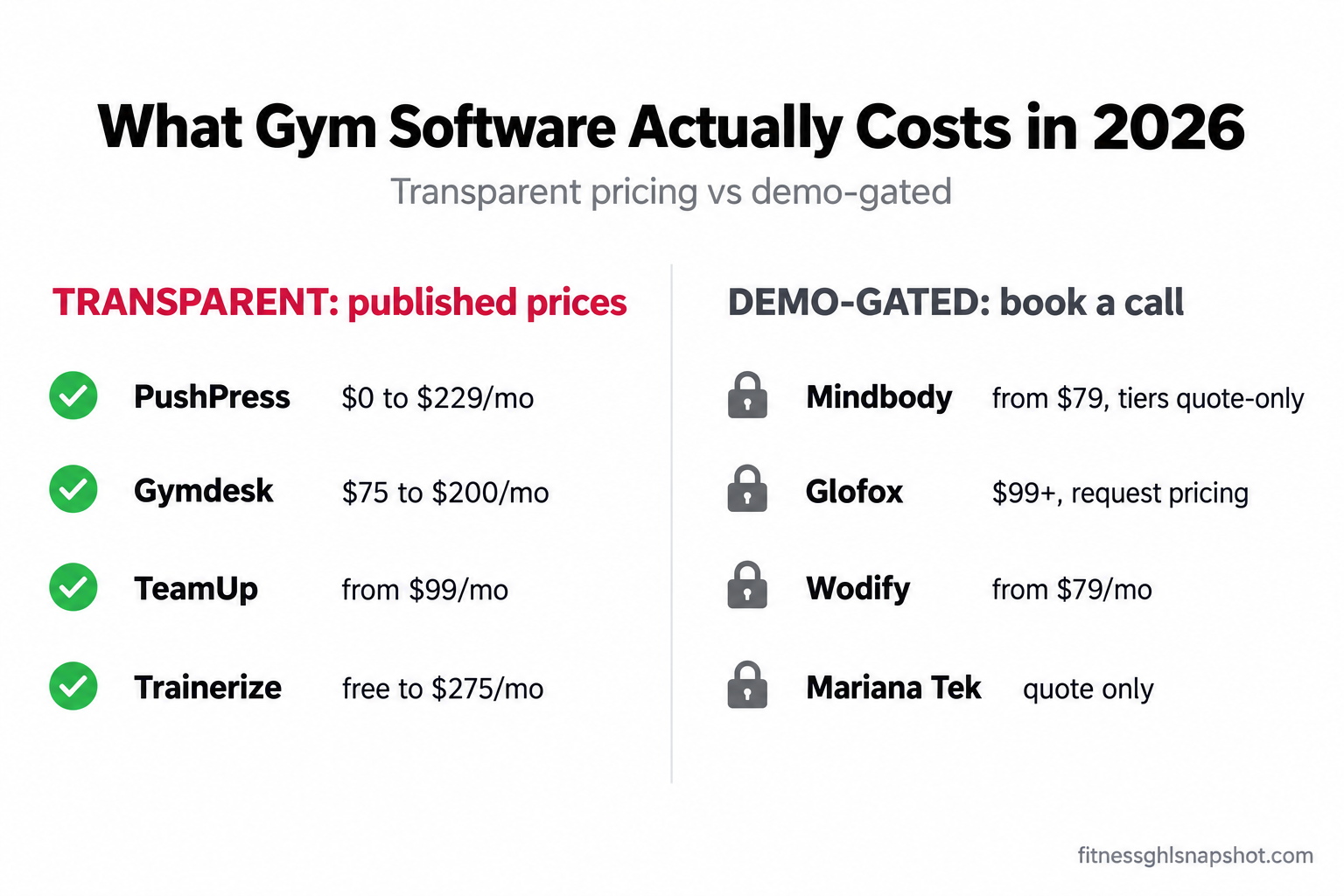
Here is the short version: in 2026, gym management software runs anywhere from $0 to $600+ a month, and the vendors charging the most are usually the ones that won’t show you a price until you sit through a demo. The transparent tier (PushPress, Gymdesk, TeamUp, Trainerize) publishes real numbers you can plan around. The demo-gated tier (Mindbody, Glofox, Wodify, Mariana Tek) makes you book a call, and reported starting prices land far above the intro numbers they advertise. The sticker price is never the real price. Setup fees, per-member scaling, paid add-ons, card-processing rates, and contract lock-in are where the actual cost hides. This post shows you all of it, with sources, so you can budget without booking a single demo.
It is the last week of the month and you are trying to figure out what your software actually costs. The plan you signed at “$85 a month” is now $180 after two quiet increases and a branded-app add-on you forgot about. You go to price a competitor and every button says “book a demo.” I have sat on the other side of that invoice for three-location studios, and the pattern never changes: the price you pay is rarely the price you were shown. So let’s tear it apart.
Table of contents
- What gym software actually costs in 2026 (the ranges)
- The transparent tier: prices you can actually see
- The demo-gated tier: why they hide the number
- The four hidden costs nobody quotes you
- Steal this: the true-cost worksheet
- Three real cost scenarios
- The contract is a cost: cancellation and auto-renewal in 2026
- Where GoHighLevel fits (own vs rent)
- Questions operators ask before they buy
- FAQ
What gym software actually costs in 2026 (the ranges)
Strip away the marketing and gym management software falls into a range. On the low end, a solo trainer can run on a free plan or single-digit dollars a month. On the high end, a multi-location studio on a premium platform with add-ons can clear $500–$600 a month before card-processing fees. Most independent gyms and boutique studios land somewhere in the $100–$350/mo band.
It’s a big, growing market, which is part of why pricing is such a jungle. In 2024, 77 million Americans, about 25% of people aged 6 and up, held a fitness-facility membership (Health & Fitness Association, 2025 Consumer Report). That’s a lot of gyms competing, and a lot of software vendors competing to sell to them, each with its own pricing games.
But there are really two markets, and the difference matters more than the number:
- The transparent tier publishes full tier prices on a public page. You can budget without talking to anyone. This is PushPress, Gymdesk, TeamUp, and ABC Trainerize.
- The demo-gated tier shows you tier names, feature lists, and at most a low “starting at” teaser, then hides the real dollars behind “book a demo.” This is Mindbody, Glofox, Wodify, and Mariana Tek. When the real tiers are quote-only, it usually means the number is negotiable, high, or both.
Check the transparent-versus-gated split first: a published price is a promise you can hold a vendor to, while a quote-only price is a negotiation you usually lose, because the salesperson knows their number and you don’t. Below, real figures on both sides.
The transparent tier: prices you can actually see
These four publish their prices. Numbers below are current published or widely reported 2026 figures, with sources. Confirm your exact tier before you buy, because member-count bands shift.
PushPress. Three published tiers: Free ($0/mo), Pro ($159/mo), and Max ($229/mo) (G2, 2026 · Capterra, 2026). The catch is that PushPress sells modules on top of the core plan. Card-processing rates run about 4.99% on Free, 2.89% on Pro, and 2.75% on Max, and a full stack (core + CRM + workout tracking + branded app) has been reported to land near $559/mo (Gymdesk review of PushPress, 2026). The free plan is genuinely useful for a new box; the real cost shows up as you bolt on the pieces that make it an all-in-one.
Gymdesk. The cleanest pricing model on this list: flat tiers by active member count, everything included, no setup fees and no contracts. Published tiers are roughly $75/mo (up to 50 members), $100/mo (51–100), $150/mo (101–200), and $200/mo (201–400), with a custom Enterprise tier above that (Gymdesk pricing · Wodify breakdown, 2026). Extra locations run about $50/mo each and a branded app about $100/mo. Frozen, cancelled, and prospect contacts don’t count toward your active-member band, which keeps the price honest as you grow.
TeamUp. Prices by active customer count with no setup fee and free data migration. Reported entry pricing starts around $99–$119/mo for up to 100 active customers, scaling up from there (commonly cited near $189/mo for the 101–200 band) (Capterra, 2026 · Exercise.com, 2026). Reviewers routinely call it a more affordable, more transparent alternative to Mindbody, and the “everything included, no paywalled add-ons” model is the main reason.
ABC Trainerize. Built for trainers and coaching businesses more than front-desk gyms, and priced that way. There is a free plan for one client, a Grow plan around $10/mo (up to 2 clients), a Pro plan from about $25/mo scaling to ~$135/mo (up to 50 clients), and a Studio Plus plan from about $275/mo (up to 500 members) (Trainerize pricing · QuickCoach, 2026). Watch the add-ons: Stripe payments ($10/mo), a branded app ($169 one-time), and advanced nutrition ($20–$45/mo) are extra (Coachway, 2026).
Transparent gym software: published 2026 pricing
| Plan | Gymdesk recommended | PushPress | TeamUp | ABC Trainerize |
|---|---|---|---|---|
| Price | $75–$200/mo | $0–$229/mo + modules | from ~$99/mo | free–$275+/mo |
| Feature 1 | Flat tiers by active member count | Free / Pro $159 / Max $229 | Scales by active customer count | Free (1 client) / Grow ~$10 / Pro to ~$135 |
| Feature 2 | Everything included at every tier | Modules (CRM, app) add up fast | No setup fee, free data migration | Studio Plus from ~$275/mo |
| Feature 3 | No setup fees, no contracts | Processing 2.75%–4.99% by tier | No paywalled add-ons | Payments, app, nutrition are add-ons |
| Feature 4 | +$50/mo per extra location, +$100/mo branded app | Fully loaded reported near $559/mo | ~$189/mo around the 101–200 band | Coaching-first, not front-desk-first |
| Feature 5 | Best fit: budget-conscious gyms wanting all features | Best fit: CrossFit boxes wanting a strong free start | Best fit: class-based studios leaving Mindbody | Best fit: solo & online personal trainers |
The demo-gated tier: why they hide the number
Now the vendors that make you book a call. Each one publishes at most a low “starting at” number and then gates the tiers you’d actually run on behind a demo. When you finally get the quote, it’s often annual, bundled, and higher than the teaser you saw in the ad.
Mindbody. The biggest name and the most opaque real pricing. Mindbody advertises a Starter plan from $79/mo per location (Mindbody, 2026; G2 reports the Starter around $99/mo, per G2). But Starter is limited, and the tiers most studios need (Accelerate, Ultimate, Ultimate Plus) are quote-only. Third-party roundups estimate Accelerate around $259–$299/mo and Ultimate tiers as high as $499–$699/mo (vibefam, 2026); treat those as third-party estimates, not official numbers. Operators also report surprise year-over-year increases. Mindbody is powerful and its marketplace is real, but the pricing opacity is exactly why so many studios shop alternatives.
Glofox (ABC Glofox). Publishes “Plans starting at $99/month” on its own site, but every tier reads “Request Pricing,” so the real number comes from a call. Capterra lists a starting price around $110/mo (Capterra). Operator-reported spend runs from roughly $110–$150/mo (Essential) up to $500–$600+/mo (Enterprise), plus a platform payment surcharge, per third-party breakdowns (vibefam, 2026). It’s aimed at boutique studios and franchises that want a branded app, and the price climbs with those add-ons.
Wodify. The most transparent of the gated group, and CrossFit-focused. Capterra and G2 list a starting price of $79/mo (Essentials), per location (Capterra · G2), though some sources cite $99. Higher tiers and add-ons (like performance/programming modules) push the real cost up, and exact tier prices aren’t cleanly published. If you run a box and want native workout tracking plus membership management, it’s a serious option, but price the add-ons before you commit.
Mariana Tek (Xplor). The most opaque on this list, aimed at higher-end boutique studios and multi-location brands. There’s no official public price; GetApp reports a starting price around $99/mo (GetApp), while Exercise.com estimates real custom pricing lands around $179–$285/mo (Exercise.com). Everything is quote-based, so budget from the estimate and get your number in writing.
The pattern across all four is the same: a small teaser number, then a demo. Those advertised starts ($79–$99) are the floor, not the price you’ll pay, which is why the eight-question email later in this post exists.
The four hidden costs nobody quotes you
The monthly plan is the number they show you. These four are the numbers you find out about later. This is where budgets blow up, so treat each one as a line item to ask about before you sign.
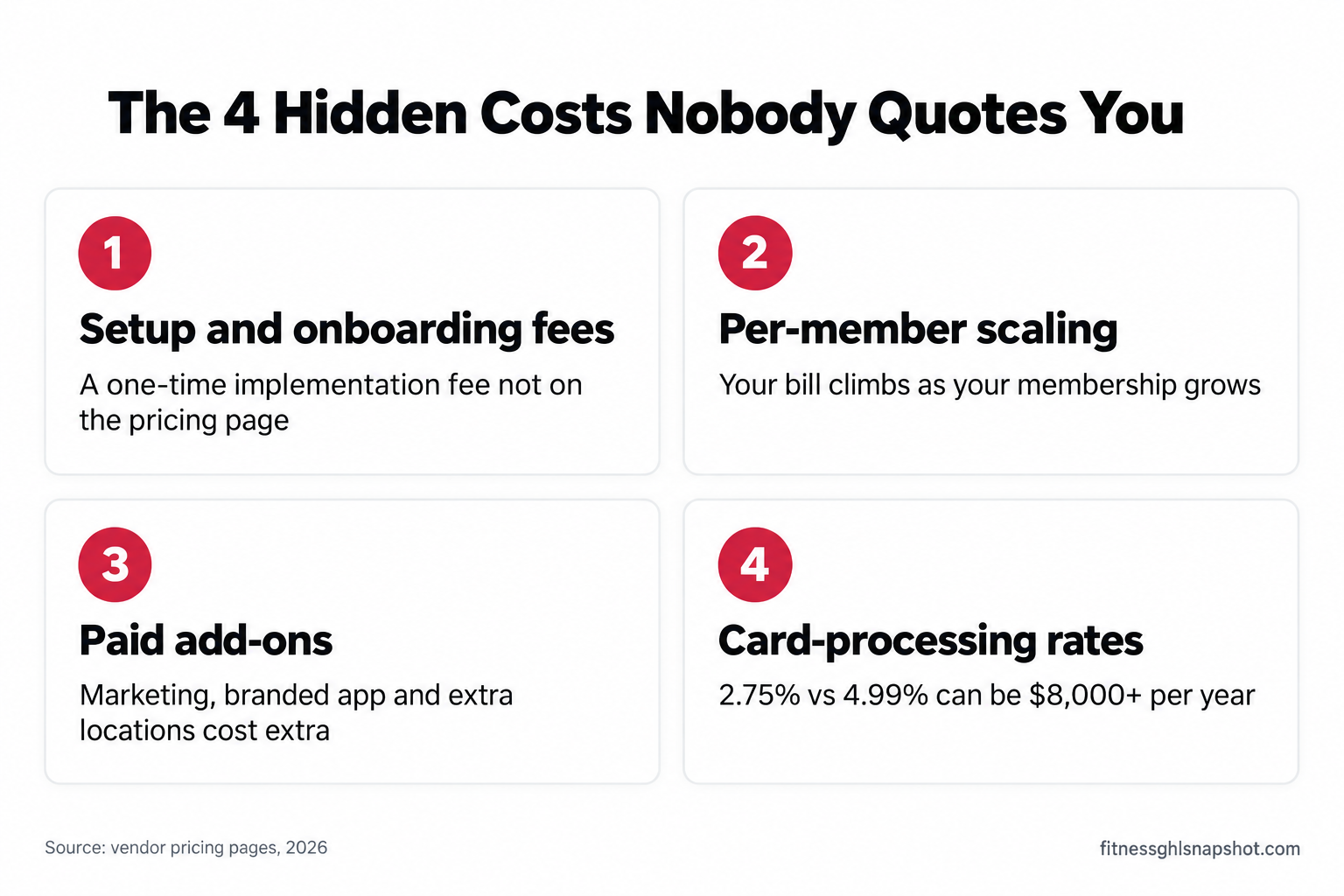
1. Setup and onboarding fees. Some platforms charge a one-time implementation or data-migration fee that never appears on the pricing page. Gymdesk and TeamUp explicitly advertise no setup fee and free migration, which is a real cost advantage. Others quote a setup fee only once you’re in the demo. How it breaks: you budget the monthly and get hit with a four-figure onboarding invoice in month one. What to do: ask “is there any one-time setup, onboarding, or migration fee?” in writing before signing.
2. Per-member or per-client scaling. Most of these tools price by how many active members or clients you have (Gymdesk, TeamUp, Trainerize) or nudge you up tiers as you grow. That’s fair, but it means the $100/mo you signed at 90 members becomes $150/mo at 120 without you changing anything. How it breaks: your software cost climbs every time you succeed at growing. What to do: map your price at your 12-month member target, not today’s count.
3. Paid add-ons. The base plan rarely includes everything. Marketing automation, a branded mobile app, extra locations, advanced nutrition, and CRM modules are commonly separate line items. A branded app alone is often $100–$169 (one-time or monthly), and marketing/engagement add-ons can run $200+/mo on some platforms. How it breaks: the “all-in-one” you bought needs three add-ons to actually be all-in-one. What to do: list the features you’ll actually use, then price the plan that includes all of them, not the cheapest tier.
4. Card-processing rates. If members pay through the platform, the processing rate is part of your real cost. A difference between 2.75% and 4.99% on $30,000/mo in member payments is $672/mo, or over $8,000 a year. How it breaks: you compare monthly plan prices and ignore the percentage quietly skimming every membership charge. What to do: compare processing rates, and ask whether you can bring your own processor.
Illustrative: how a published “$159/mo” PushPress Pro plan grows once CRM, workout tracking, and a branded app are added. Fully loaded figure reported by Gymdesk, 2026. Your number depends on which modules you add.
Steal this: the true-cost worksheet
Copy this. It is the fastest way to compare two tools honestly and to force a real number out of a demo-gated vendor. Run every platform through the same math before you decide.
The true monthly cost formula:
True monthly cost =
    base plan (at YOUR 12-month member count)
  + paid add-ons you'll actually use (marketing, app, extra locations)
  + (monthly card volume × processing rate)
  + (one-time setup fee ÷ 12)
The eight questions to ask before you sign (or to email a demo-gated vendor):
- What is the exact monthly price at my current member/client count, and at 25% more?
- Is that billed monthly or annually, and is the annual price locked or introductory?
- Is there a one-time setup, onboarding, or data-migration fee?
- Which of the features I need are add-ons, and what does each cost?
- What is the card-processing rate, and can I use my own processor?
- What is the contract length and the notice period to cancel?
- If I cancel, can I export my full member list and payment history, and is there a fee?
- Have prices increased for existing customers in the last two years, and by how much?
The break-even check. Before you pay for any tool, know the number of members it has to keep or convert to pay for itself:
Members the software must earn back =
    total monthly software cost ÷ average monthly membership price
If a platform costs you $250/mo all-in and your average membership is $125/mo, the tool has to save or win back two members a month to break even. That is a low bar for good automation and an impossible one for software you don’t use. Which brings us to the real question: not “what’s cheapest,” but “what does my size actually need?”
Three real cost scenarios
The “best value” tool is different for each size of operation. Here’s how the math actually plays out for three real setups.
Scenario 1: the solo personal trainer (20–60 clients)
You coach in person and online, take payments, and program workouts. You do not need class scheduling or a front desk. The fit: ABC Trainerize (Pro around $25–$135/mo depending on client count) or Gymdesk’s Micro tier at $75/mo if you want gym-style member management. The trap: paying for a Mindbody-class platform you’ll use 10% of. At your size, a demo-gated enterprise tool is the most expensive way to text 40 people. True monthly cost target: $25–$100/mo. The break-even is a single client, so almost any transparent tool pays for itself; the risk is overbuying, not underbuying.
Scenario 2: the boutique studio (80–250 members, 2–8 instructors)
You run classes, waitlists, and packages, and you live or die by class fill rate and retention. The fit: TeamUp (~$99–$189/mo) or Gymdesk ($100–$150/mo) for transparent, all-included pricing, or Mindbody if you specifically need its marketplace discovery. The trap: the add-on stack. On a demo-gated platform, the marketing automation and branded app that make retention work are often separate line items that can double your bill. True monthly cost target: $150–$350/mo all-in. At an average $140 membership, you need one to three saved members a month to break even, which retention automation should clear easily.
Scenario 3: the mid-size or multi-location gym (250–500+ members)
You have multiple staff, maybe multiple locations, and real payment volume. Now the percentages matter as much as the plan. The fit: Gymdesk’s higher tiers plus per-location fees, PushPress Max with its lower 2.75% processing rate, or a demo-gated enterprise platform if you need heavy reporting. The trap: card processing and per-location scaling. At $40,000/mo in member payments, a 2% difference in processing is $800/mo, which dwarfs the plan price. True monthly cost target: $300–$600+/mo, and the processing rate is often the biggest single line. What to do: negotiate processing hard, and price every extra location before you sign.
Illustrative midpoint of the realistic all-in monthly software cost for each operator size, based on the published and reported pricing above. Actual cost depends on member count, add-ons, and processing volume.
The contract is a cost: cancellation and auto-renewal in 2026
Here is a cost that never appears on a pricing page: how hard it is to leave. If you think the federal government now guarantees you an easy cancel, check the date. The FTC’s “click-to-cancel” Negative Option Rule was vacated by the Eighth Circuit on July 8, 2025, days before it took effect, on procedural grounds (Sidley Austin, 2025). The FTC has since started steps toward a new rulemaking (it submitted a draft advance notice in January 2026), but as of now there is no federal click-to-cancel rule in effect (Crowell & Moring, 2026).
What that means for you as a buyer: the protection you actually have runs through state auto-renewal laws, which more than half of states have, with California’s Automatic Renewal Law among the strictest. So the cancellation and auto-renewal terms in your software contract are the real thing to read, not the vacated federal rule. This matters for the demo-gated platforms most, because their contracts are the ones you can’t preview on a public page.
Before you sign anything, get three terms in writing: the contract length, the notice period to cancel (some require 30–60 days’ written notice), and the data-export rights if you leave. A tool that holds your member list and payment history hostage on exit is more expensive than its monthly price suggests, because switching cost is a cost. This is the same discipline you’d apply when migrating off a legacy platform or connecting your gym software to a growth layer: know how you get out before you get in.
Where GoHighLevel fits (own vs rent)
Every tool above prices on a rent model: a monthly subscription that grows as you grow, forever. There’s another model worth knowing about, and I’ll be honest about where it fits and where it doesn’t.
GoHighLevel is a CRM and marketing-automation platform with open pricing: $97/mo (Starter), $297/mo (Unlimited), and $497/mo (SaaS Pro), held steady from 2025 into 2026, plus usage-based SMS, email, and voice (ClickFunnels breakdown, 2026). It is not a check-in, billing, or scheduling replacement for the tools above. It’s the growth layer: capturing leads, following up in the first five minutes, recovering no-shows, running retention sequences, and harvesting reviews.
That’s the honest framing. Most gyms keep the member-management tool that runs their operation and add a growth layer on top, because the tool that checks members in was never built to chase the lead who filled a form at 9 p.m. Our done-for-you Fitness system is that growth layer, pre-built for gyms: a $997 one-time build you own, run on your own GoHighLevel account, rather than another per-member subscription. For agencies serving gyms, it’s also resellable. If you want the platform itself, you can start GoHighLevel here.
Questions operators ask before they buy
“Why won’t Mindbody, Glofox, Wodify, or Mariana Tek just show me a price?” Because quote-only pricing lets them price by how big you are and how motivated you seem, and it gets you on a sales call. It’s a strategy, not an accident. The workaround is the eight-question email above: put the questions in writing, make them answer in writing.
“Is the cheapest tool always the best value?” No, and it’s the most common mistake I see. Value is cost divided by what you actually use. A $75/mo tool you never configure is expensive; a $250/mo tool that saves three members a month at $140 each is nearly free. Price against your break-even number, not the other sticker prices.
“I already pay for Mindbody. Do I have to rip it out?” Usually not. If it runs your billing and scheduling well, the smarter move is often to keep it and add a growth layer for the follow-up and retention it doesn’t do. Ripping out a working system has a switching cost (migration, retraining, downtime) that can exceed a year of the price difference.
“Do I need to be technical to run any of these?” For the transparent tools, no. They’re built for owners. The real gap isn’t the software’s difficulty, it’s the time to configure the automations that move revenue, which is exactly why done-for-you setup exists as a category.
The bottom line
Gym software pricing in 2026 is a two-tier market. The transparent tier (PushPress, Gymdesk, TeamUp, Trainerize) tells you the truth on a public page, with real numbers between $0 and about $275/mo depending on size. The demo-gated tier (Mindbody, Glofox, Wodify, Mariana Tek) advertises a low intro and quotes higher. Either way, the sticker is not the cost: setup fees, per-member scaling, add-ons, processing rates, and contract lock-in are where the money goes.
Run every option through the true-cost formula, price it at your 12-month member count, ask the eight questions in writing, and know your break-even number before you sign. And remember the biggest cost of the wrong tool isn’t the monthly fee, it’s the members you lose because the follow-up and retention work never got automated. That’s the layer worth paying for, whatever runs your front desk.
Frequently asked questions
How much does gym management software cost in 2026?
It ranges from $0 to over $600 a month. Transparent vendors publish real numbers: PushPress runs $0–$229/mo, Gymdesk $75–$200/mo, TeamUp from about $99/mo, and ABC Trainerize from free up to $275+/mo. Demo-gated vendors like Mindbody, Glofox, Wodify, and Mariana Tek hide their pricing behind a sales call, and reported starting prices are higher than the intro numbers they advertise. Most independent gyms and boutique studios land in the $100–$350/mo band once add-ons and processing are counted.
How much does Mindbody actually cost?
Mindbody advertises a Starter plan from about $79/month per location, but Starter is limited and the tiers most studios need (Accelerate, Ultimate, Ultimate Plus) are quote-only, so you have to book a demo for a real number. Third-party roundups estimate Accelerate around $259–$299/month and Ultimate tiers as high as $499–$699/month, and operators report surprise year-over-year increases. Because pricing is opaque, budget well above the advertised intro and get your exact quote, contract length, and renewal terms in writing before signing.
Which gym software is actually the cheapest?
For a solo trainer, ABC Trainerize (free to ~$25/mo) or Gymdesk's $75/mo Micro tier are the cheapest capable options. For a class-based studio, Gymdesk ($100–$150/mo) and TeamUp (from ~$99/mo) are the most affordable transparent choices with everything included. 'Cheapest' depends on your member count and which features you need, since most tools scale by active members and charge extra for add-ons like a branded app or marketing automation.
Why do gym software companies hide their pricing?
Quote-only pricing lets a vendor set the price based on your size and buying signals, and it forces you onto a sales call before you see a number. Mindbody, Glofox, Wodify, and Mariana Tek all use this model. The best defense is to email your specific questions (exact price at your member count, billing terms, setup fees, add-on costs, processing rate, contract length, and cancellation notice) and require written answers so you can compare apples to apples.
What hidden fees should I watch for in a gym software contract?
Four main ones: a one-time setup or data-migration fee that isn't on the pricing page, per-member scaling that raises your bill as you grow, paid add-ons (marketing automation, branded app, extra locations, advanced nutrition), and card-processing rates that skim every membership charge. Also read the contract length, cancellation notice period, and data-export rights, because switching cost is a real cost.
Does the FTC click-to-cancel rule protect me when cancelling gym software?
No. The FTC's click-to-cancel Negative Option Rule was vacated by the Eighth Circuit on July 8, 2025, and is not in effect as of 2026. The FTC has started steps toward a new rulemaking, but for now your cancellation protection comes from state auto-renewal laws, which more than half of states have, with California's among the strictest. Read your contract's renewal and cancellation terms directly rather than relying on a federal rule.
Written by Divya Kapoor, Member Retention & Lifecycle Specialist. Divya ran member experience for a three-location boutique pilates and yoga group before joining the team to design retention systems, and she spends most of her time in the unglamorous membership-and-billing data that tells you what your software actually costs. She writes about onboarding, churn, and the numbers behind keeping studios full.