
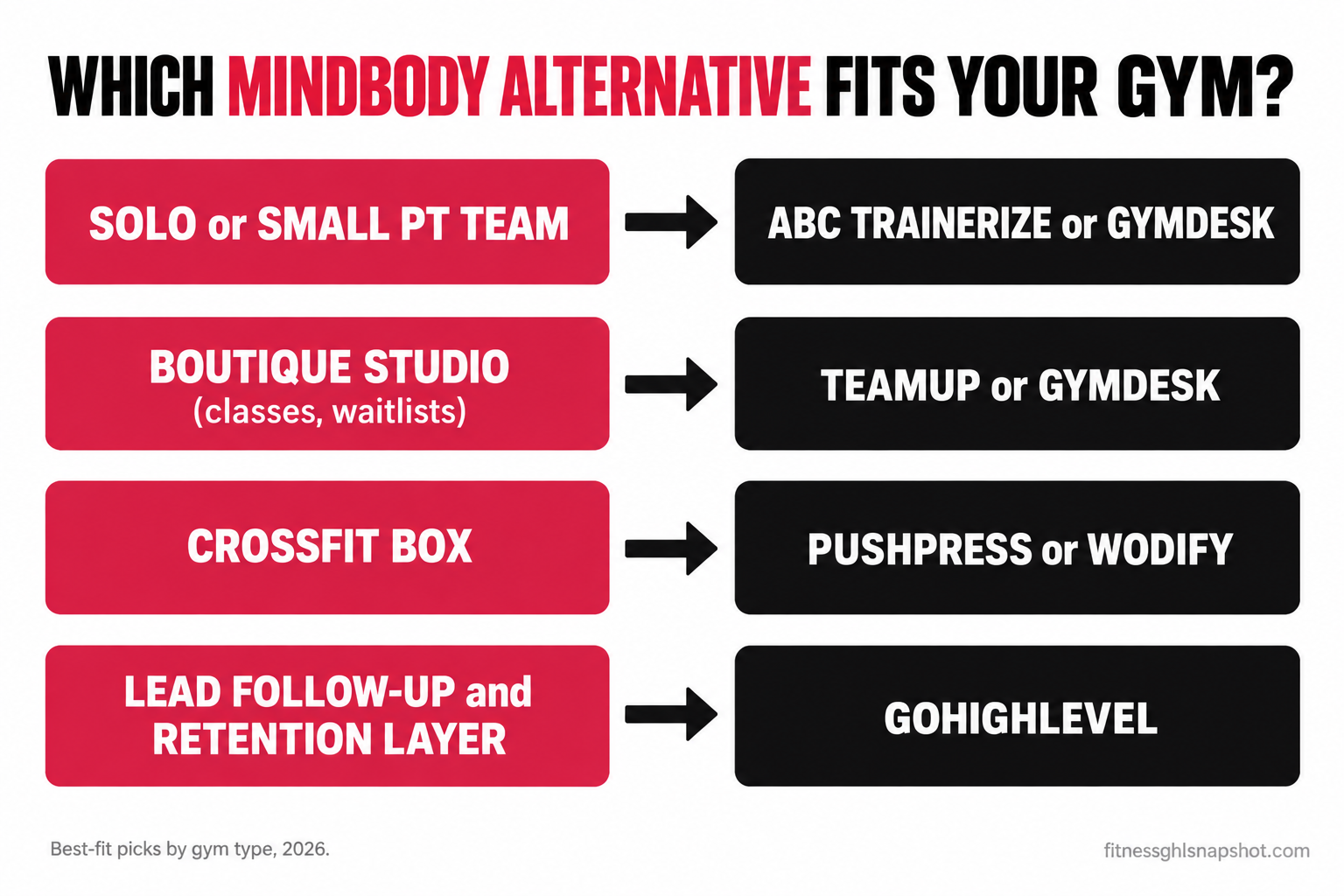
The short version: the best Mindbody alternative for a small gym in 2026 depends on what you run, not on which tool has the longest feature list. Class-based studios that want honest, published pricing go to TeamUp or Gymdesk. CrossFit boxes go to PushPress or Wodify. Solo and small personal-training teams go to ABC Trainerize. And whatever runs your front desk, the thing that actually grows the gym, fast lead follow-up and retention, is a separate layer most of these tools do poorly, which is where GoHighLevel comes in. This post matches each alternative to a real gym type, with reported prices and sources, and it is honest about migration cost and the one gap none of them close.
It is a Tuesday night and you are staring at a Mindbody invoice that is bigger than last year’s, again. Your class fill rate is fine, your members like the app, but the bill keeps creeping and half the features you pay for you have never opened. You Google “Mindbody alternative for a small gym” and get ten listicles that all recommend the tool that pays them the most. I have moved studios off Mindbody and onto four different platforms, and the truth is boring: the right answer is the one that fits how your gym actually runs. Let’s find yours.
Table of contents
- Why small gyms leave Mindbody in the first place
- The 8 things to check before you switch
- The 6 best Mindbody alternatives in 2026
- Which alternative fits your gym?
- What switching actually costs
- Steal this: the switch-off-Mindbody email
- Questions operators ask before they switch
- FAQ
Why small gyms leave Mindbody in the first place
Mindbody is not a bad product. It runs a huge share of the boutique fitness market, its consumer marketplace app sends real discovery traffic, and for a big multi-location brand it can be the right call. The problem is that it was built for a different customer than the 150-member independent box or the two-instructor pilates studio. Three things push small operators to shop around.
The price creeps and you can’t see it coming. Mindbody advertises a Starter plan (reported around $99 a month per location), but the tiers most studios actually need, Accelerate, Ultimate and Ultimate Plus, are quote-only. You book a demo to get a number, and third-party roundups put those tiers well into the hundreds per month per location. When the real price lives behind a sales call, the number tends to be negotiable, high, or both. We break the full market down in what gym software actually costs in 2026.
It does everything except the thing that makes you money. Mindbody schedules classes, takes payments and checks members in. What it does not do well is chase the lead who filled out your form at 9pm, or catch the member who quietly stopped showing up three weeks ago. That is the gap that actually costs a small gym its growth, and it is why so many operators feel like the software is busy while the business is leaking. I wrote about that feeling in detail in why Mindbody feels broken for gyms.
You outgrow the parts and pay for the whole. The all-in-one that made sense at launch becomes a bill for twenty features you use three of. A smaller, cheaper, more focused tool starts to look like the smarter spend.
The fitness market is huge and growing. A record 77 million Americans, about 25% of everyone aged 6 and up, held a gym or studio membership in 2024 (Health & Fitness Association, 2025 Consumer Report). That means a lot of software vendors competing for your monthly fee, which is good news: you have real options. Here is how to choose between them.
The 8 things to check before you switch
Before you fall for a feature demo, score every alternative on the eight things that actually decide whether a switch is worth it. Most listicles compare feature checklists. These are the ones that bite you later.
- Real, published price at your member count, not a teaser that needs a demo.
- Best-fit gym type, because a tool built for online coaches is wrong for a CrossFit box.
- Class scheduling and waitlists, if you run group classes, this is non-negotiable.
- Payments and dunning, the processing rate and whether it retries failed cards.
- Lead follow-up and automation, the growth work Mindbody leaves on the table.
- Migration and data export, how easily you get your members and history in and out.
- Contracts and lock-in, month-to-month versus a long term with a notice period.
- Branded or member app, if your members expect to book from their phone.
Mindbody alternatives at a glance (reported 2026 pricing)
| Plan | Gymdesk recommended | TeamUp | PushPress | ABC Trainerize |
|---|---|---|---|---|
| Price | ~$75–$200/mo | from ~$104/mo | $0 / $159 / $229/mo | free–$275+/mo |
| Feature 1 | Flat tiers by active member count | Scales by active customer count | Genuinely useful free plan | Coaching-first, not front-desk-first |
| Feature 2 | No setup fees, no contracts | No setup fee, free data migration | Modules (CRM, app) cost extra | Client app, workouts & nutrition |
| Feature 3 | Everything included at every tier | No paywalled add-ons | Lower processing on higher tiers | Free (1 client) to Studio Plus ~$275 |
| Feature 4 | Strong for budget-minded studios & boxes | Great class & waitlist handling | Built around gym & box operations | Weak for class scheduling |
| Feature 5 | Best fit: small gyms wanting all features, cheap | Best fit: class-based studios leaving Mindbody | Best fit: CrossFit boxes & strength gyms | Best fit: solo & online personal trainers |
The 6 best Mindbody alternatives in 2026
Here is each one, who it is right for, and, just as important, where it breaks. All prices are current reported 2026 figures with sources; confirm your exact tier before you buy, because member-count bands and promos move.
1. Gymdesk: the transparent all-rounder
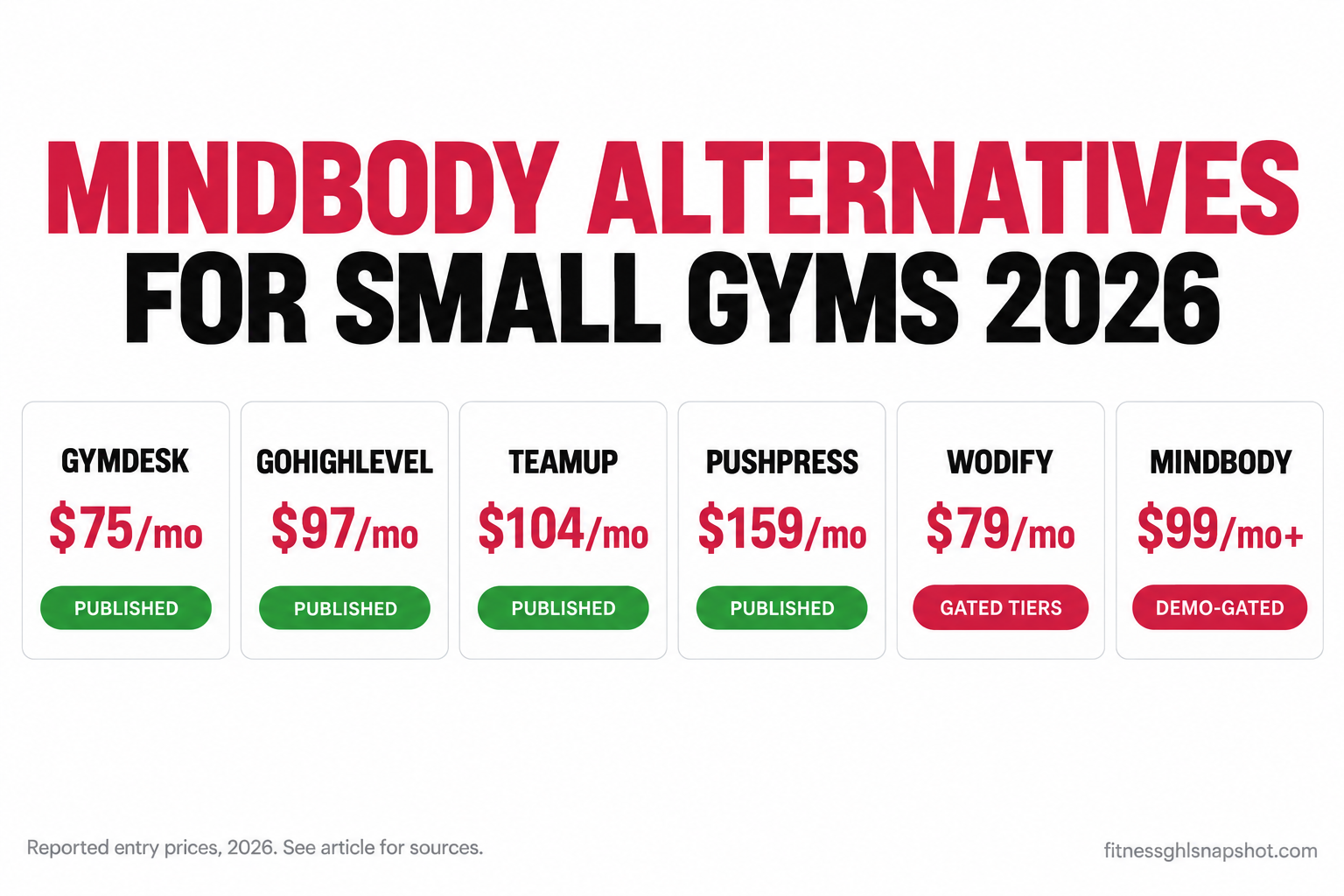
Gymdesk has the cleanest pricing on this list: flat tiers by active member count, everything included, no setup fees and no contracts. Reported tiers run roughly $75/mo (up to 50 members), $100/mo (51–100), $150/mo (101–200) and $200/mo (201–400), with extra locations about $50/mo and a branded app about $100/mo (Gymdesk pricing · Gymdesk cost guide, 2026). Frozen and cancelled contacts do not count toward your band, so the price stays honest as you grow.
Who it fits: budget-conscious independent gyms and studios that want the full feature set without an add-on stack.
Where it breaks: it is a management tool, not a marketing engine. Gymdesk will bill and schedule beautifully, but it will not run a five-minute speed-to-lead sequence or a win-back campaign for you. If your problem is growth, not admin, Gymdesk alone will not fix it.
2. TeamUp: built for class-based studios
If you live and die by class fill rate, TeamUp is the alternative most Mindbody refugees land on. It prices by active customer count, starts around $104/mo for the entry band (some sources report a Basic tier near $119/mo, so confirm on the live page), charges no setup fee, and includes free data migration (TeamUp pricing · Exercise.com breakdown, 2026). Reviewers consistently call it a friendlier, more transparent Mindbody, and the class, package and waitlist handling is genuinely good.
Who it fits: yoga, pilates, barre and group-fitness studios that want strong scheduling and honest pricing.
Where it breaks: it is not a heavy CRM. Automations exist but are light. If you want deep lead nurture, behavioral triggers, or two-way SMS at scale, you will feel the ceiling.
3. PushPress: the gym and box operator’s pick
PushPress is built around how a real gym runs, and its free plan is genuinely useful for a new box. Published tiers are Free ($0/mo), Pro ($159/mo) and Max ($229/mo) (Wodify’s PushPress breakdown, 2026 · Exercise.com, 2026). Card-processing rates drop as you go up tiers (reported roughly 4.99% on Free down to about 2.75% on Max), which matters a lot at volume.
Who it fits: CrossFit boxes and strength gyms that want a strong operational core and a low-cost start.
Where it breaks: the modules. PushPress sells CRM, workout tracking and a branded app on top of the core plan, so the “$159” you signed up for grows as you bolt on the pieces that make it an all-in-one. Price the full stack, not the base tier.
4. ABC Trainerize: for trainers, not front desks
Trainerize is coaching software, not gym-management software, and that distinction saves you from a bad fit. It gives trainers a client app, workout and nutrition programming, and online payments, with a free plan for one client, a Grow plan from about $10/mo, a Pro plan from around $25/mo scaling to roughly $135/mo, and a Studio Plus plan from about $275/mo (Trainerize pricing · QuickCoach, 2026).
Who it fits: solo personal trainers, online coaches and small PT teams who sell programs, not class packs.
Where it breaks: the front desk. Trainerize is weak at group-class scheduling, waitlists and physical-location check-in. If you run a studio floor with a class timetable, this is the wrong tool, however good the coaching app is.
5. Wodify: CrossFit-native, with gated tiers
Wodify is purpose-built for CrossFit and functional-fitness boxes, with native WOD tracking, leaderboards and performance history baked in. Its entry Essentials tier is published around $79/mo per location (watch for promo-versus-regular pricing, with a regular rate reported closer to $179/mo), while the higher Accelerate tiers are quote-only (Wodify pricing · Exercise.com, 2026).
Who it fits: boxes that want workout tracking and membership management in one native tool and care about the performance side.
Where it breaks: the same opacity problem as Mindbody creeps in at the higher tiers, and it is narrow outside CrossFit. If you are a yoga or pilates studio, Wodify is built for someone else.
6. GoHighLevel: the growth layer, not the front desk
Here is the honest one. Every tool above prices on a rent model and is built to manage members. GoHighLevel is a different animal: a CRM and marketing-automation platform with open, published pricing of $97/mo (Starter), $297/mo (Unlimited) and $497/mo (SaaS Pro), which I confirmed live on GoHighLevel’s own pricing page. It is not a check-in or class-scheduling replacement. It is the layer that captures leads, follows up in the first five minutes, recovers no-shows, runs retention sequences and harvests reviews.
Who it fits: any gym that is losing money to slow follow-up and silent churn, which is most of them. Usually you keep the member-management tool that runs your floor and add this on top.
Where it breaks: if you try to make it your front desk. It was not built to check members into a 6am class, and pretending otherwise leads to frustration. Use it for growth, not operations.
Reported entry monthly prices, 2026. Gymdesk, TeamUp and PushPress figures are third-party-reported (Gymdesk, Exercise.com, Wodify); GoHighLevel is vendor-published; Mindbody’s $99 is its advertised Starter, with higher tiers quote-only. Your real cost depends on member count and add-ons.
Which alternative fits your gym?
The “best” alternative is different for each kind of operation. Here is how the choice plays out for three real setups, because the answer genuinely changes.
The solo or small PT team (20–100 clients)
You coach in person and online, sell packages and programs, and do not need a class timetable or a front desk. The fit: ABC Trainerize for the coaching app and client experience, or Gymdesk’s entry tier if you want light gym-style member management too. The trap: paying for a Mindbody-class platform you will use 10% of. At your size, an enterprise booking tool is the most expensive way to text 40 people. What to add: a simple follow-up sequence so no prospect inquiry sits unanswered, which is exactly the speed-to-lead problem that costs solo coaches the most bookings.
The boutique studio (80–250 members, 2–8 instructors)
You run classes, waitlists and packages, and your whole month rides on fill rate and retention. The fit: TeamUp or Gymdesk for transparent, all-included scheduling, both cheaper and clearer than Mindbody. Keep Mindbody only if you specifically need its marketplace discovery traffic. The trap: on Mindbody, the marketing automation and branded app that actually drive retention are often separate line items that quietly double your bill. What to add: an onboarding and retention layer, because the first 30 days decide who stays, and no booking tool runs that for you.
The CrossFit box or mid-size gym (150–500 members)
You have a coaching floor, real payment volume and members who care about performance. The fit: PushPress for the operational core and lower processing on higher tiers, or Wodify if native WOD tracking and leaderboards matter to your community. The trap: the module and per-location math. Price the branded app, the CRM add-on and the processing rate before you sign, because at volume the percentage skimming every membership charge can dwarf the plan price. What to add: automated no-show recovery, since cutting no-shows is pure found revenue at box scale.
Notice the pattern. In all three cases, the member-management tool is only half the answer. The other half, the follow-up and retention that actually grows the gym, is a layer you add on top.
What switching actually costs
Here is the part the comparison charts skip. The monthly fee is not the real cost of leaving Mindbody. The real cost is migration: getting your data out cleanly, avoiding a gap where members can’t book, and not getting trapped by a contract term you forgot you signed.
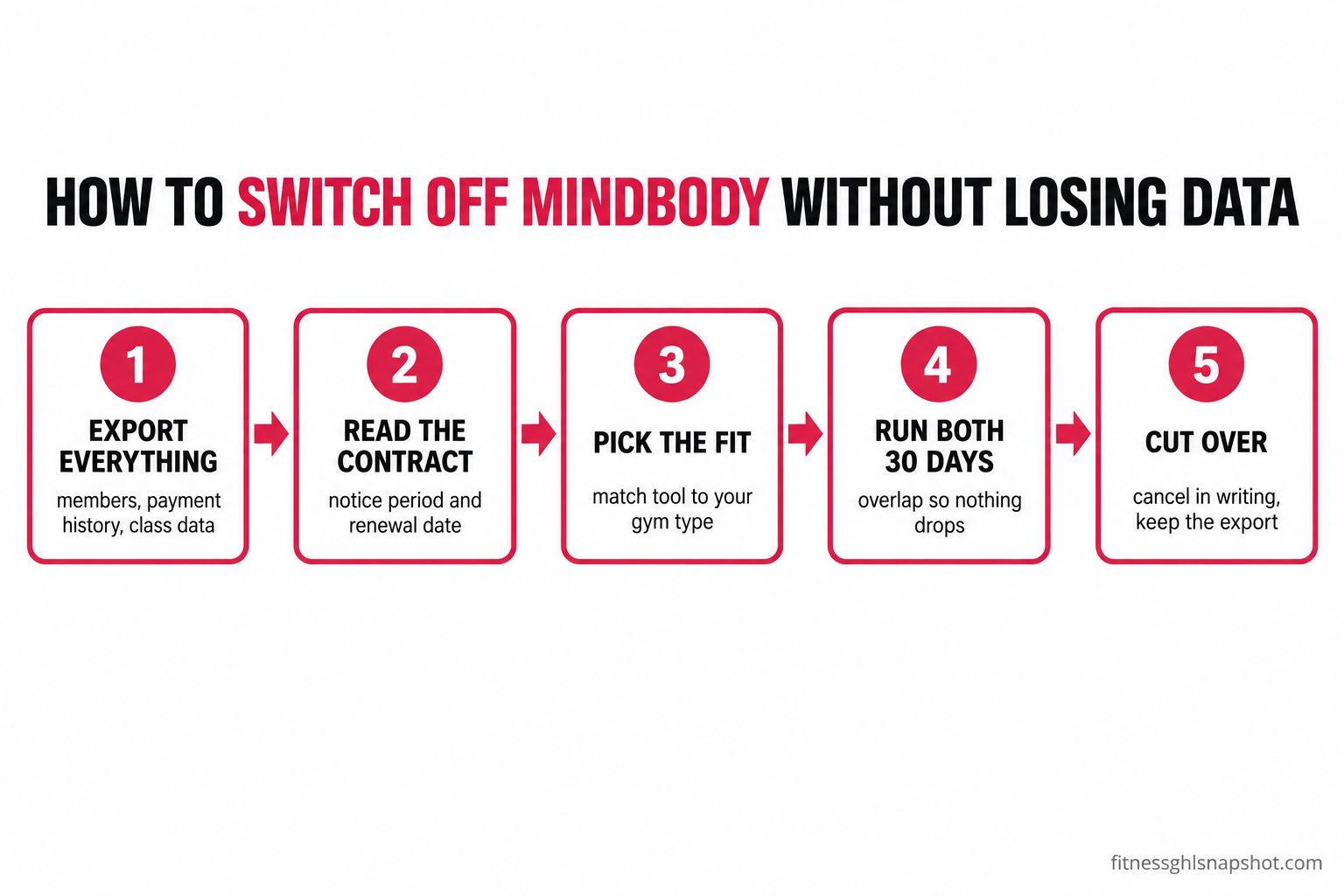
Your data is the asset. Before you cancel anything, export your full member list, payment history, class and attendance data, and any waivers. A platform that makes this hard, or charges to release it, is more expensive to leave than its monthly price suggests. Tools like TeamUp advertise free migration; use that help, but always keep your own clean export as insurance.
Read the contract before you give notice. This is where the click-to-cancel myth bites. A lot of operators believe a federal rule now guarantees an easy exit. It does not. The FTC’s “click-to-cancel” Negative Option Rule was vacated by the Eighth Circuit on July 8, 2025, and is not in effect (Sidley Austin, 2025). Your protection now runs through state auto-renewal laws, more than half of states have one, with California’s among the strictest. So the notice period and renewal date in your own software contract are the real thing to check, not a federal rule that never took effect. Some contracts want 30 to 60 days of written notice, and missing that window can cost you another billing cycle.
Run both systems in parallel. Do not cut over cold. Keep the old tool live for about 30 days while you load and test the new one, so no member ever hits a broken booking page. The overlap month is cheap insurance against a churn spike caused by your own migration. This is the same discipline we walk through in the full Mindbody-to-GoHighLevel migration guide and in connecting your gym software to a growth layer.
Steal this: the switch-off-Mindbody email
Copy this and send it to your current vendor before you commit to anything. It forces the terms into writing so you can plan the switch without surprises. Swap in your details.
Subject: Account export and cancellation terms

Hi [vendor] team,

I'm reviewing our account and need a few things in writing:

1. What is my current contract end date and the notice period to cancel?
2. Can I export my full member list, payment history, attendance
   and waivers, and is there any fee to do so?
3. What format is that export (CSV, etc.) and how long does it take?
4. If I give notice today, what is the last date I'll be billed?
5. Is there any early-termination fee on my plan?

Please reply in writing. Thanks,
[Your name], [Gym name]
And the four questions to ask every alternative before you sign a new deal:
- What is the exact monthly price at my current member count, and at 25% more?
- Which features I need are add-ons, and what does each cost?
- Is there a setup fee, and do you migrate my data for free?
- Is it month-to-month, or is there a term and a notice period?
Get every answer in writing from both sides, and the switch stops being scary. It becomes a spreadsheet.
Questions operators ask before they switch
“Won’t I lose my member history if I leave Mindbody?” Not if you export first. Pull your full member list, payment history and attendance data as CSV before you cancel, and keep that file. Most alternatives, TeamUp especially, will help import it. The data is yours; the mistake is cancelling before you have a clean copy in hand.
“I already paid Mindbody for the year. Do I have to rip it out now?” No, and rushing is usually the wrong move. If it is running your billing and scheduling fine, the smart play is often to keep it until renewal and add a growth layer for the follow-up and retention it does not do. Ripping out a working system mid-term has a switching cost, migration, retraining, downtime, that can exceed the price difference. Time the switch to your renewal date.
“Isn’t Mindbody’s marketplace worth staying for?” Sometimes. Mindbody’s consumer app does send discovery traffic, and for a studio that gets real bookings from it, that is a genuine reason to stay. But measure it. If you can’t point to a meaningful number of members who found you through the marketplace, you are paying enterprise prices for a feature you don’t use.
“Do I need to be technical to run any of these?” For the transparent tools, no. Gymdesk, TeamUp and PushPress are built for owners. The real gap is not the software’s difficulty, it is the time to configure the automations that move revenue, which is exactly why done-for-you setup exists as a category. The tool is easy; the follow-up system is the work.
The bottom line
Back to that Tuesday-night invoice. The move is not to panic-switch to whatever a listicle ranks first. It is to name your gym type, pick the alternative that fits it, and price the exit before you sign the entry. Class studio: TeamUp or Gymdesk. CrossFit box: PushPress or Wodify. Personal training: ABC Trainerize. Then run both systems for a month so nothing drops.
And remember the gap that no booking tool on this list closes. Mindbody, and every alternative to it, will schedule your classes and take your payments. None of them will chase the lead who inquired at 9pm or catch the member who ghosted three weeks ago. That follow-up and retention layer is the part that actually grows a small gym, and it is worth building whatever runs your front desk. Pick the alternative that fits, then add the layer that makes it pay.
Frequently asked questions
What is the best Mindbody alternative for a small gym in 2026?
There is no single best one; it depends on your model. Class-based boutique studios do best on TeamUp or Gymdesk, which are cheaper and more transparent than Mindbody. CrossFit boxes and strength gyms fit PushPress or Wodify. Solo and small personal-training teams fit ABC Trainerize. Whichever you pick to run your front desk, add a growth layer like GoHighLevel for the lead follow-up and retention that no booking tool does well.
Is there a cheaper alternative to Mindbody?
Yes. Gymdesk publishes flat tiers reported around $75 to $200 a month with everything included and no contracts, TeamUp starts around $104 a month, and PushPress has a genuinely useful free plan with paid tiers at $159 and $229. All three publish real prices you can budget around, unlike Mindbody, whose main tiers are quote-only. The cheapest capable option depends on your member count and whether you need class scheduling.
How much does Mindbody actually cost?
Mindbody advertises a Starter plan reported around $99 a month per location, but Starter is limited and the tiers most studios need (Accelerate, Ultimate, Ultimate Plus) are quote-only, so you have to book a demo for a real number. Third-party roundups estimate those higher tiers run well into the hundreds per month per location, and operators report year-over-year increases. Budget above the advertised intro and get your exact quote and contract terms in writing.
Which Mindbody alternative is best for CrossFit boxes?
PushPress and Wodify are the two built for boxes. PushPress has a strong operational core, a useful free plan, and lower card-processing rates on its higher tiers, with paid plans at $159 and $229 a month. Wodify is CrossFit-native with built-in WOD tracking and leaderboards, published from around $79 a month per location for Essentials, though its higher tiers are quote-only. Pick PushPress for cost and operations, Wodify if performance tracking is central to your community.
Will I lose my data if I switch from Mindbody?
Not if you export first. Before you cancel, download your full member list, payment history, attendance and waivers as CSV and keep that file. Many alternatives, including TeamUp, offer free data migration to help you import it. The key is to keep your own clean export as insurance and never cancel your old account until the new system is loaded and tested.
Does GoHighLevel replace Mindbody for a gym?
Not directly. GoHighLevel is a CRM and marketing-automation platform ($97, $297 or $497 a month), not a class-scheduling or member check-in tool. Most gyms keep a booking tool like TeamUp, Gymdesk or PushPress to run the front desk and add GoHighLevel on top as the growth layer for fast lead follow-up, no-show recovery, retention sequences and review harvesting, the work Mindbody and its alternatives leave undone.
Does the FTC click-to-cancel rule make it easy to leave my gym software?
No. The FTC's click-to-cancel Negative Option Rule was vacated by the Eighth Circuit on July 8, 2025, and is not in effect in 2026. Your cancellation protection comes from state auto-renewal laws, which more than half of states have, with California's among the strictest. Read your own software contract's notice period and renewal date directly, since some require 30 to 60 days of written notice to cancel.
Written by Bryce Kendrick, Fitness Growth Strategist and GHL Snapshot Lead. Bryce spent eight years running the floor and front desk at a fast-growing CrossFit box before moving full-time into GoHighLevel automation for gyms. He has moved studios off Mindbody onto four different platforms and cares most about the seven days around a prospect’s first class. He writes the way he coaches: direct, numbers-first, and allergic to fluff.